Screen Size Explained: What It Means for Handheld Gaming PCs
As an Amazon Associate we earn from qualifying purchases. Links on this page are affiliate links.
Handheld Gaming PC Screen Size Explained
Screen size measures the diagonal distance across the active display area from one corner to the opposite corner. Listings measure this value in inches and exclude the outer bezel. Here is handheld gaming PC screen size explained to help you evaluate your choices.
Display dimensions directly dictate device footprint and overall weight. Compact models feature 6-inch, 7-inch, or 7.4-inch panels. These smaller displays minimize chassis size, making the hardware easier to hold for extended sessions and simpler to pack into travel bags or pockets without extra bulk.
Mid-range configurations come in 8-inch and 8.8-inch variants. This segment balances handheld ergonomics with visual clarity. Many PC games feature small text, detailed menus, and dense interfaces designed for desktop monitors. An 8-inch or 8.8-inch display renders small user interface elements more legibly without spreading your hands uncomfortably far apart.
Larger devices utilize 10.95-inch, 15.6-inch, or 16-inch displays. These larger screens maximize visual space, making fine graphic details easy to track. However, screen size directly scales chassis dimensions. A 15.6-inch or 16-inch display shifts the form factor toward laptop scale, requiring a tabletop setup or kickstand rather than continuous handheld play.
When selecting a screen size, consider how you play. Compact 6-inch to 7.4-inch units favor transit and portability. Medium 8-inch to 8.8-inch units target balanced handheld usage. Displays measuring 10.95-inch up to 16-inch suit stationary play where viewable space matters most.
Handheld PC Screen Sizes Compared
Screen Size: 6-Inch
A 6-inch panel delivers a very compact footprint. On the AYANEO Pocket S, this size pairs with a 1080p display, which keeps pixel density high and images sharp. This dimension suits you if you prioritize pocketable hardware and easy travel above all else. Devices in this class fit into smaller bags without extra bulk and draw less total power. The trade-off is screen area. Smaller menus, dialogue text, and on-screen interface elements become harder to read. You also sacrifice immersion compared to wider screens when playing detailed games.
Screen Size: 7-Inch
A 7-inch display represents a standard balance between physical handling and screen area. In the ASUS ROG Ally 7, this panel pairs with a 120Hz refresh rate and an AMD Ryzen Z1 Extreme processor. At 1.1 pounds, the chassis remains manageable during extended play sessions. This size suits you if you want a conventional handheld shape that balances readable text with travel portability. The trade-off involves desktop navigation. Operating system icons, menus, and dense PC user interfaces can feel cramped without external scaling or a connected external monitor.
Screen Size: 7.4-Inch
A 7.4-inch screen provides a slight visual expansion over standard 7-inch displays. Panels like the Olivechard 7.4-Inch OLED Screen Replacement cater directly to specific handheld repairs on compatible PC hardware. This size suits you if you want slightly wider viewing angles and clear visibility without increasing your device footprint beyond portable limits. OLED panels at this size also highlight deep contrast levels. The trade-off is hardware specificity. A 7.4-inch panel is strictly tailored to specific internal mounts and will not fit alternative shells or general handheld chassis designs.
Screen Size: 8-Inch
An 8-inch screen expands viewable area while keeping the system manageable in two hands. On the Lenovo Legion Go S, this size runs at a 1920 x 1200 resolution with a 120Hz refresh rate. This dimension suits you if you struggle to read small text in strategy games or complex role-playing titles. The extra diagonal length provides clarity for menus and subtitles. The primary trade-off is device bulk. Handhelds housing an 8-inch panel require larger carrying cases and add physical width, making extended holding tiring for some users.
Screen Size: 8.8-Inch
An 8.8-inch display moves handheld hardware closer to tablet territory. The ONEXPLAYER 3 uses this format with a touchscreen interface running Windows 11. This larger diagonal suits you if you use your device for dual roles, combining gaming sessions with productivity software or office tasks. Touch inputs and desktop icons are much easier to hit accurately on an 8.8-inch panel. The trade-off is handling comfort. The extra screen diagonal demands a broader chassis, making the device harder to hold for hours without resting your arms on a table or lap.
Screen Size: 10.95-Inch
A 10.95-inch screen offers the largest visual area available in this class. Featured on the ONEXPLAYER X2 alongside a 120Hz refresh rate, this size approaches laptop proportions. It suits you if you prioritize detailed multitasking, large UI elements, and immersive gameplay without plugging into an external monitor. It gives you expansive visual space for menus and split windows. The trade-off centers on portability and weight. A 10.95-inch device cannot be held comfortably like a standard portable console for long periods, requiring table support or stationary lap placement during gameplay.
Screen Size: Is It Worth It?
Who needs it
You need to care about screen size if you play PC games with dense interfaces, tiny subtitles, or fine mouse-driven targets. Operating systems designed for desktops shrink down significantly on 6-inch and 7-inch displays. Choosing panels measuring 8 inches, 8.8 inches, or larger gives you legible system fonts and larger touch controls without scaling issues.
You also need a larger screen if you play without external monitors and demand visual clarity in complex simulation or strategy games. Larger formats up to 10.95 inches, 15.6 inches, or 16 inches replace secondary portable monitors entirely. For true on-the-go play, staying around 6 to 7.4 inches ensures the device remains manageable in your hands.
Who can skip it
You can skip prioritizing screen size if you primarily play connected to a television or an external desktop monitor. When docked, the internal panel turns off or sits unused, making its diagonal measurement irrelevant.
You should also ignore screen size if overall unit weight, battery life, or raw computing specs matter more to you. A larger display adds chassis weight, increases power draw, and reduces portability. Instead, focus your attention on processor models, RAM capacity, storage speed, and ergonomic grip designs that match your standard gaming posture.
Handheld PC Screen Terms
Pixels Per Inch (PPI)
Pixel density measures detail per inch of glass. A 7-inch 1080p panel yields roughly 314 PPI. Higher values keep text sharp when you hold the device close to your eyes.
Aspect Ratio
Aspect ratio describes proportional width to height. Most handhelds use 16:9 or 16:10 formats. A 16:10 panel gives you extra vertical room, while 16:9 matches standard widescreen games.
Native Resolution
Native resolution counts physical pixels built into the display. Running games at 1920x1080 on a 1080p panel produces clean images, whereas mismatched rendering can blur onscreen text as you play.
Refresh Rate
Refresh rate counts screen redraws per second, measured in hertz. Standard panels run at 60Hz, while faster displays reach 120Hz or 144Hz. Higher rates deliver smoother motion when you play.
Display Panel Type
Display type denotes panel technology, usually IPS LCD or OLED. OLED lights individual pixels for deep blacks, while IPS LCD relies on backlights to give you consistent viewing angles.
Bezel Width
Bezel width measures the border surrounding active screen glass. Thinner bezels maximize viewable territory without enlarging device housing, which lets you view larger graphics on compact hardware.
Display Scaling
Display scaling resizes interface elements across the operating system. Setting scaling to 125% or 150% enlarges tiny desktop icons, helping you interact accurately with small touch targets.
Quick picks
| # | Product | Best for | Price |
|---|---|---|---|
| 1 | ASUS ROG Ally 7" 120Hz Z1 Extreme Handheld | players seeking high refresh rate visuals | Check price of ASUS ROG Ally 7" 120Hz Z1 Extreme Handheld on Amazon |
| 2 | Lenovo Legion Go S 8" 120Hz | Users needing high RAM on an 8-inch screen | Check price of Lenovo Legion Go S 8" 120Hz on Amazon |
| 3 | ONEXPLAYER 3 8.8" 3-in-1 Handheld | portable 3-in-1 gaming and work | Check price of ONEXPLAYER 3 8.8" 3-in-1 Handheld on Amazon |
| 4 | Olivechard 7.4-Inch OLED Screen Replacement | Steam Deck OLED glossy display repairs | Check price of Olivechard 7.4-Inch OLED Screen Replacement on Amazon |
| 5 | ONEXPLAYER X2 10.95" 48GB | High RAM multitasking and large 120Hz display users | Check price of ONEXPLAYER X2 10.95" 48GB on Amazon |
| 6 | AYANEO Pocket S 6-Inch Android Handheld | compact Android gaming with strong cooling | Check price of AYANEO Pocket S 6-Inch Android Handheld on Amazon |
Our 6 picks

ASUS ROG Ally 7" 120Hz Z1 Extreme Handheld
Best for: players seeking high refresh rate visuals
- Screen Size
- 7-Inch (what this guide is about)
- Processor
- AMD Z1 Extreme
- Storage
- 512GB
- Refresh Rate
- 120Hz
- Color
- White
- Dimensions
- 11 × 4.4 × 0.8 inches
View on Amazon: ASUS ROG Ally 7" 120Hz Z1 Extreme Handheld Affiliate link
The ASUS ROG Ally 7 features a 7-inch 120Hz display and an AMD Z1 Extreme processor. It includes 512GB of storage and measures 4.4 x 11 x 0.8 inches. This white handheld weighs 1.1 pounds. You get smooth visuals and solid processing power for gaming. It suits players who want a compact device with a high refresh rate screen.
Pros
- AMD Z1 Extreme processor for strong performance
- 7-inch 120Hz refresh rate display
- 512GB storage capacity
- Compact 0.8-inch thickness
Cons
- 1.1 pounds weight may cause fatigue
- 512GB storage fills quickly with large games
- Renewed condition means used parts
Good fit if
- You want a high refresh rate screen
- You prefer a compact handheld form factor
- You need AMD Z1 Extreme performance
Skip if
- You need maximum storage capacity
- You prefer a brand new device
- You want a lighter handheld
Verdict: ASUS ROG Ally 7 120Hz White delivers solid specs for portable gaming. It fits players who value screen smoothness and processor speed in a compact white chassis.
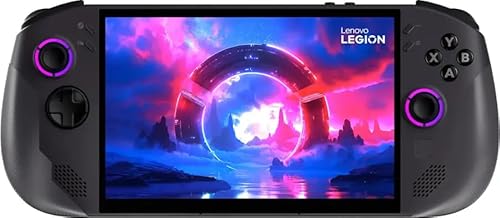
Lenovo Legion Go S 8" 120Hz
Best for: Users needing high RAM on an 8-inch screen
- Screen Size
- 8-Inch (what this guide is about)
- Processor
- AMD Ryzen Z1 Extreme
- RAM
- 32GB
- Storage
- 1TB SSD
- Refresh Rate
- 120Hz
- Resolution
- 1920x1200
View on Amazon: Lenovo Legion Go S 8" 120Hz Affiliate link
The Lenovo Legion Go S features an 8-inch WUXGA display with a 120Hz refresh rate. It is powered by an AMD Ryzen Z1 Extreme processor and 32GB of RAM. This combination supports smooth gameplay on SteamOS. The 1TB SSD provides ample storage. It suits players who want a mid-sized screen with high-end internal components for portable gaming.
Pros
- 8-inch WUXGA (1920x1200) screen
- 120Hz refresh rate for smooth visuals
- AMD Ryzen Z1 Extreme processor
- 32GB RAM for multitasking
- 1TB SSD storage capacity
Cons
- Resolution is lower than 2.5K or QHD alternatives
- Graphics are integrated AMD Radeon 780M
- 8-inch size is smaller than 10.95-inch options
Good fit if
- You prefer an 8-inch screen balance
- You need 32GB RAM for heavy loads
- You want SteamOS out of the box
Skip if
- You require 2.5K or higher resolution
- You want a 10.95-inch or larger display
- You need a dedicated graphics card
Verdict: Lenovo Legion Go S 8" 32GB RAM delivers strong processing power for its class. It fits users prioritizing RAM and processor speed over maximum screen resolution.

ONEXPLAYER 3 8.8" 3-in-1 Handheld
Best for: portable 3-in-1 gaming and work
- Screen Size
- 8.8-Inch (what this guide is about)
- Processor
- Arc G3 Extreme
- RAM
- 32GB LPDDR5X
- Storage
- 1TB SSD
- Refresh Rate
- 144Hz
- Display Type
- AMOLED
View on Amazon: ONEXPLAYER 3 8.8" 3-in-1 Handheld Affiliate link
The ONEXPlayer 3 is a 3-in-1 handheld PC featuring an 8.8-inch 144Hz AMOLED touchscreen. It runs on Windows 11 with an Arc G3 Extreme processor and 32GB LPDDR5X RAM. The device supports gaming, tablet, and laptop modes. You get a 1TB SSD and an 85Wh battery. This setup handles AAA titles and productivity tasks on one portable device.
Pros
- 8.8-inch 144Hz AMOLED display with HDR
- 32GB LPDDR5X RAM for multitasking
- Arc G3 Extreme processor performance
- Detachable controllers for three usage modes
- Dual USB4 ports for connectivity
Cons
- Smaller 8.8-inch screen compared to larger competitors
- 2-3 hours of heavy gaming battery life
- Limited to 1920x1200 resolution on AMOLED panel
Good fit if
- You want a compact 3-in-1 device
- You need high RAM for productivity
- You prefer AMOLED display quality
Skip if
- You require a larger screen size
- You need all-day heavy gaming endurance
- You prefer a traditional laptop form factor
Verdict: ONEXPlayer 3 8.8" AMOLED Handheld suits users who prioritize portability and display quality over raw screen real estate. It fits those who need a versatile device for gaming and office work.

Olivechard 7.4-Inch OLED Screen Replacement
Best for: Steam Deck OLED glossy display repairs
- Screen Size
- 7.4-Inch (what this guide is about)
- Display Type
- OLED
- RAM
- 64GB RAM
- Storage Capacity
- 512GB
- Platform
- PC
- Dimensions
- 3.15 × 1.97 × 0.79 inches
View on Amazon: Olivechard 7.4-Inch OLED Screen Replacement Affiliate link
This is a 7.4-inch OLED replacement screen assembly designed for the Steam Deck OLED. It features a glossy finish and integrates both the display panel and the touch digitizer. It fits users repairing damaged displays on compatible non-matte models who want original OLED color depth and touch responsiveness on a 7.4-inch handheld form factor.
Pros
- 7.4-inch glossy OLED panel
- Integrated touch screen digitizer
- Direct fit for Steam Deck OLED 2023 models
Cons
- Incompatible with 7.0-inch Steam Deck LCD models
- Not recommended for 1TB matte-finish Steam Deck models
- Requires manual disassembly and installation
Good fit if
- You need to replace a damaged screen on a Steam Deck OLED.
- You prefer a glossy display surface over anti-glare matte glass.
- You want an assembly that includes the touch screen digitizer.
Skip if
- You own a 2022 Steam Deck LCD model.
- You have a 1TB Steam Deck OLED with an anti-glare matte screen.
- You want a complete handheld PC rather than a replacement component.
Verdict: Olivechard 7.4" Steam Deck OLED Screen is built strictly for owners replacing a broken glossy display on a 2023 OLED handheld. It gives you a direct-spec panel swap while maintaining original 7.4-inch touch and OLED visuals.

ONEXPLAYER X2 10.95" 48GB
Best for: High RAM multitasking and large 120Hz display users
- Screen Size
- 10.95-Inch (what this guide is about)
- Processor
- Intel Arc G3 Extreme
- RAM
- 48GB LPDDR5x
- Storage
- 1TB M.2 2280 PCIe 4.0 SSD
- Refresh Rate
- 120Hz
- Display Type
- LTPS
View on Amazon: ONEXPLAYER X2 10.95" 48GB Affiliate link
The ONEXPLAYER X2 is a Windows 11 handheld featuring an Intel Arc G3 Extreme processor and Arc B390 graphics. It includes 48GB of LPDDR5x unified memory and a 1TB PCIe 4.0 SSD. The 10.95-inch LTPS display offers 2560x1600 resolution and a 120Hz refresh rate. Detachable controllers with hall-effect triggers allow flexible use. This system suits players who need high RAM for multitasking and a large, bright screen for immersive gaming sessions.
Pros
- 48GB LPDDR5x unified memory supports heavy multitasking and AAA titles
- 10.95-inch LTPS screen with 120Hz refresh and 540 nits brightness
- Detachable controllers feature hall-effect triggers and 6-axis gyro
- 1TB M.2 2280 PCIe 4.0 SSD provides fast storage and expandability
Cons
- Single fan cooling may limit sustained performance under heavy loads
- Front 1MP camera is low resolution for video calls
- No dedicated discrete GPU limits maximum graphical fidelity
Good fit if
- You want high RAM capacity for emulation and multitasking
- You prefer a large 10.95-inch display with 120Hz refresh
- You need detachable controllers for tablet or desktop modes
Skip if
- You require a discrete graphics card for ray tracing
- You need a high-resolution front camera for streaming
- You prefer a single-fan cooling system for quiet operation
Verdict: ONEXPLAYER X2 Intel Arc 48GB delivers strong multitasking power through its 48GB RAM and large 120Hz display. It fits users who prioritize memory capacity and screen size over discrete graphics performance.

AYANEO Pocket S 6-Inch Android Handheld
Best for: compact Android gaming with strong cooling
- Screen Size
- 6-Inch (what this guide is about)
- Processor
- Snapdragon G3x Gen 2
- RAM
- 16GB
- Storage
- 512GB
- Resolution
- 1920x1080
- Operating System
- Android
View on Amazon: AYANEO Pocket S 6-Inch Android Handheld Affiliate link
The AYN Pocket S is a 6-inch Android handheld powered by the Snapdragon G3x Gen 2. It features 16GB of RAM and 512GB of storage. The device uses a borderless 1080p screen with 400 nits brightness. It includes active air cooling and a 6000mAh battery. This setup suits you if you want a compact, high-performance Android gaming device with strong thermal management.
Pros
- Snapdragon G3x Gen 2 processor
- 16GB RAM and 512GB storage
- 6-inch 1080p borderless display
- Active air cooling system
Cons
- 400 nits brightness may struggle in direct sunlight
- 390g weight feels substantial in one hand
- No mention of wireless controller support
Good fit if
- You prioritize screen-to-body ratio
- You want 16GB RAM for multitasking
- You prefer active cooling for sustained play
Skip if
- You need a brighter screen for outdoor use
- You prefer a lighter device under 350g
- You require native Windows PC gaming
Verdict: AYANEO Pocket S Android 6-Inch delivers strong specs in a compact form. It fits you if you want a dedicated Android handheld with robust cooling and ample memory.
Specifications side by side
| Spec | ASUS ROG Ally 7" 120Hz Z1 Extreme Handheld | Lenovo Legion Go S 8" 120Hz | ONEXPLAYER 3 8.8" 3-in-1 Handheld | Olivechard 7.4-Inch OLED Screen Replacement | ONEXPLAYER X2 10.95" 48GB | AYANEO Pocket S 6-Inch Android Handheld |
|---|---|---|---|---|---|---|
| Processor | AMD Z1 Extreme | AMD Ryzen Z1 Extreme | Arc G3 Extreme | not stated | Intel Arc G3 Extreme | Snapdragon G3x Gen 2 |
| RAM | not stated | 32GB | 32GB LPDDR5X | not stated | 48GB LPDDR5x | 16GB |
| Storage | 512GB | 1TB SSD | 1TB SSD | not stated | 1TB M.2 2280 PCIe 4.0 SSD | 512GB |
| Screen Size | 7 inch | 8" | 8.8" | 7.4" | 10.95" | 6" |
| Refresh Rate | 120Hz | 120Hz | 144Hz | not stated | 120Hz | not stated |
| Display Type | not stated | not stated | AMOLED | OLED | LTPS | not stated |
| Resolution | not stated | 1920x1200 | 1920x1200 | not stated | 2560x1600 | 1920x1080 |
| Graphics | not stated | AMD Radeon 780M | not stated | not stated | Arc B390 | not stated |
| Operating System | not stated | SteamOS | Win11 | not stated | Windows 11 | Android |
| Storage Capacity | 512GB | 1TB | 1TB | 512GB | 1TB | 512GB |
| Screen Resolution | not stated | 1920 x 1200 | not stated | not stated | QHD | 1080p |
| Color | White | Nebula Nocturne | not stated | Black screen for steamdeck OLED (64GB, 256GB, 512GB) | Gray | White |
| Graphics Card | not stated | AMD Radeon | not stated | not stated | not stated | not stated |
| Memory | not stated | 32GB | 32GB | 64GB | not stated | 16GB |
| Platform | not stated | not stated | PC | PC | PC | Mobile |
| Dimensions | 11 × 4.4 × 0.8 inches | not stated | not stated | 3.15 × 1.97 × 0.79 inches | 10 × 2 × 50 inches | not stated |
| Weight | 1.1 pounds | not stated | not stated | not stated | not stated | not stated |
| Size | 4.4 x 11 x 0.8 inches | not stated | not stated | 7.4" steamdeck glossy OLED 2023 versions display | Intel Arc G3-48GB+1TB | 16GB+512GB |
| Model | ASUS ROG Ally 7 | 8APU1 | onexplayer 3 | steam deck OLED vision glossy screen | DO-X2-48+1-B | b745d714-d3e1-4c37-828c-6afd3f79a426 |
Frequently asked questions
What is the standard screen size for handheld gaming PCs?
Seven inches serves as the standard baseline display size for most portable gaming computers. This diagonal offers enough visibility for complex layouts while controlling physical bulk. The ASUS ROG Ally uses a 7-inch panel with a 120Hz refresh rate, keeping its weight at 1.1 pounds for easy handling.
How does screen size affect handheld refresh rates?
Physical screen size does not limit display speed. Fast refresh rates appear across small and large form factors alike. For example, the 7-inch ASUS ROG Ally, the 8-inch Lenovo Legion Go S, and the 10.95-inch ONEXPLAYER X2 all deliver 120Hz refresh rates despite their differing screen dimensions.
Does an 8-inch screen make a noticeable difference over 7 inches?
Yes, expanding to an 8-inch screen offers more viewing space for detailed game graphics and desktop environments. The Lenovo Legion Go S provides an 8-inch display running at a 1920 x 1200 resolution. This extra room helps you read menus more easily than on standard 7-inch hardware.
Are screen sizes over 10 inches practical for handheld gaming?
Displays measuring over 10 inches favor stationary viewing and heavy multitasking over pure handheld portability. The ONEXPLAYER X2 features a 10.95-inch display paired with 48GB of system memory. This large format gives you extensive visual workspace, but it requires significantly larger chassis dimensions than standard portable models.
What display size works best for Android handheld gaming?
A 6-inch display works exceptionally well for mobile operating systems and lightweight travel. The AYANEO Pocket S uses a 6-inch screen with a sharp 1080p resolution and Android software. This smaller form factor allows for a more compact body while maintaining clean visuals for native mobile titles.
What screen size do Steam Deck OLED replacement displays use?
Replacement displays for 2023 Steam Deck OLED units measure exactly 7.4 inches diagonally. The Olivechard replacement display matches this 7.4-inch OLED specification directly. When swapping damaged glass on compatible hardware, choosing this exact panel dimension ensures you preserve the original touch functionality and visual format without fitment errors.