Screen Resolution in Handheld Gaming PCs: What It Is and Is It Worth It?
As an Amazon Associate we earn from qualifying purchases. Links on this page are affiliate links.
Screen Resolution Explained for Handhelds
Screen resolution refers to the number of distinct pixels displayed on your handheld gaming PC screen. It is measured by width and height. Common values include 1920 x 1080, 1280 x 800, and 4K. Higher numbers mean more detail. You see sharper images. Text looks cleaner. Game graphics appear more defined. This spec is a key factor in visual quality. It directly impacts how you experience games on a small device.
Most listings label this spec clearly. You will see terms like Full HD or 1080p. These both mean 1920 x 1080 pixels. This is the standard for many devices. It offers a good balance of clarity and performance. Some models use WQXGA or QHD. These are higher than 1080p. They provide sharper visuals. However, they demand more from the hardware. You may need to lower in-game settings to maintain smooth play. Other devices use 1280 x 800. This is lower resolution. It is easier for the chip to drive. You get better battery life and higher frame rates. The trade-off is less sharpness.
Why does this matter to you? It affects both image quality and system load. A higher resolution screen requires more processing power. The GPU must render more pixels. This can reduce battery life. It can also lower frame rates if the chip is not powerful enough. You must check the resolution against the internal specs. A 4K screen on a weak chip will struggle. A 1080p screen on a strong chip will run smoothly. Always look at the pixel count. It tells you the potential sharpness. It also hints at the performance cost. Balance is key. Choose a resolution that matches your hardware capabilities. This ensures you get the best experience without unnecessary lag or drain.
Screen Resolution Options Compared
1080p
This resolution, often called Full HD, displays 1920 by 1080 pixels. It is a standard balance for handhelds. The image is sharp enough for most games without draining the battery quickly. Lower resolution means less strain on the graphics chip. You get longer play sessions. The ASUS ROG Ally X uses this spec. It pairs a 1080p screen with 24GB of RAM. This setup favors performance over extreme detail. If you want smooth frame rates, this is a practical choice.
WQXGA
WQXGA offers a higher pixel count than standard HD. It provides sharper text and clearer game visuals. The increased detail helps in games with complex environments. However, higher resolution demands more from your GPU. You may need to lower in-game settings to maintain speed. The Lenovo Legion Go 2 features a WQXGA OLED panel. This combination delivers high fidelity. It suits users who prioritize visual clarity. The trade-off is higher power consumption. You must manage battery life carefully during long sessions.
1280 x 800
This resolution is common in smaller handhelds. It offers a native 800p experience. The pixel density is sufficient for a 7-inch screen. Lower resolution reduces the load on the processor. This helps maintain higher frame rates. The AYANEO GEEK uses this spec. It runs games smoothly without needing high-end graphics power. This is ideal for casual gaming. You get a lighter battery drain. The image is less sharp than 1080p. But for many titles, the difference is minimal. It is a budget-friendly and efficient option.
QHD
QHD, or Quad HD, provides four times the pixels of 720p. It is often found in external displays or headsets. The Goovis G3 Max uses a QHD Micro-OLED panel. This offers exceptional clarity for immersive viewing. You can attach it to your handheld for a larger screen. The resolution is sharp enough for detailed textures. It works well with consoles and PCs. This is not a built-in handheld screen. It is an accessory for portable setups. You get a premium viewing experience. The main trade-off is portability. You carry extra hardware.
1920 x 1200
This resolution has a 16:10 aspect ratio. It offers more vertical space than 16:9 screens. This is helpful for UI elements and maps. The Lenovo Legion Go S uses this spec. It pairs with 32GB of RAM. The larger screen size enhances the gaming experience. You get a more immersive view. The resolution is sharper than 1080p. It requires more graphics power. You may need to adjust settings. This is best for large-screen handhelds. The extra pixels add clarity. It suits users who want a tablet-like feel.
Full HD
Full HD is another name for 1080p. It is the most common resolution for handhelds. The ASUS ROG Ally 7 uses this spec. It offers a balance of clarity and performance. You get sharp visuals without excessive power use. The 120Hz refresh rate works well with 1080p. This ensures smooth motion. It is a safe choice for most gamers. The image quality is good for most titles. You do not need top-tier hardware to run it. It is efficient and reliable. This is the standard for modern handheld gaming PCs.
Is High Resolution Worth It
Who needs it
You should prioritize higher screen resolutions if visual fidelity is your main concern. Buyers who enjoy playing visually rich games on larger screens will benefit from QHD or WQXGA displays. These resolutions offer sharper text and more detailed textures, enhancing immersion in open-world titles or strategy games where UI clarity matters. If you connect your handheld to an external monitor, a higher native resolution ensures the image remains crisp when scaled up. Users who plan to keep their device for several years may also prefer higher resolutions, as they future-proof the experience against increasingly demanding game engines. The extra pixel density makes a noticeable difference in sharpness, especially when viewing the screen from a normal distance. It is ideal for those who value aesthetic quality over raw performance efficiency.
Who can skip it
You can skip high-resolution displays if battery life and performance are your top priorities. Lower resolutions like 1280 x 800 or standard 1080p place less strain on the internal graphics processor. This allows the device to maintain higher frame rates in demanding games, resulting in smoother gameplay. If you primarily play fast-paced shooters or competitive titles, consistent performance matters more than image sharpness. Additionally, if you use your handheld primarily for retro gaming or indie titles, the lower pixel count is perfectly adequate. You will not notice a significant difference in visual quality for these types of games. Prioritizing battery efficiency and thermal management will provide a better overall experience. Focus on cooling solutions and processor speed instead of pixel count for maximum enjoyment.
Key Screen Terms
Pixel Count
The total number of individual dots making up the image. Higher counts yield sharper visuals but demand more processing power from your device.
Aspect Ratio
The proportional relationship between screen width and height. Most handhelds use 16:10 or 16:9, affecting how games fill the display area.
Pixel Density
Pixels per inch, determining image sharpness at a given viewing distance. Higher density reduces visible grain on small handheld screens.
Native Resolution
The actual physical pixel grid of the display. Games often render at this level to avoid blurring or scaling artifacts.
Upscaling
Technique increasing lower-resolution images to fit the screen. It saves battery but may introduce slight blurriness compared to native rendering.
Rendering Scale
A setting allowing you to render games below native resolution. This improves performance while keeping the final output sharp on the panel.
Refresh Rate
How often the screen updates per second, measured in Hertz. Higher rates like 120Hz create smoother motion, independent of resolution.
Quick picks
| # | Product | Best for | Price |
|---|---|---|---|
| 1 | HIDevolution ASUS ROG Ally X 7" 120Hz | Users needing 24GB RAM and a 120Hz screen | Check price of HIDevolution ASUS ROG Ally X 7" 120Hz on Amazon |
| 2 | Lenovo Legion Go 2 Handheld Gaming PC | high-fidelity OLED handheld gaming | Check price of Lenovo Legion Go 2 Handheld Gaming PC on Amazon |
| 3 | AYANEO GEEK 7-inch Touchscreen PC | native 800p handheld PC gaming | Check price of AYANEO GEEK 7-inch Touchscreen PC on Amazon |
| 4 | Goovis G3 Max QHD Micro-OLED Headset | immersive high-res viewing with handhelds | Check price of Goovis G3 Max QHD Micro-OLED Headset on Amazon |
| 5 | Lenovo Legion Go S 8" 120Hz | Large-screen portable gaming with high RAM | Check price of Lenovo Legion Go S 8" 120Hz on Amazon |
| 6 | ASUS ROG Ally 7 120Hz Ryzen Z1 | Users wanting a larger 7-inch 120Hz Windows handheld | Check price of ASUS ROG Ally 7 120Hz Ryzen Z1 on Amazon |
Our 6 picks

HIDevolution ASUS ROG Ally X 7" 120Hz
Best for: Users needing 24GB RAM and a 120Hz screen
- Screen Resolution
- 1080p (what this guide is about)
- Processor
- AMD Ryzen Z1 Extreme
- RAM
- 24GB LPDDR5X
- Storage
- 1TB PCIe SSD
- Screen Size
- 7"
- Refresh Rate
- 120Hz
View on Amazon: HIDevolution ASUS ROG Ally X 7" 120Hz Affiliate link
This HIDevolution build uses the ASUS ROG Ally X chassis with a Ryzen Z1 Extreme processor and 24 GB of LPDDR5X RAM. The 7-inch 1080p display runs at 120Hz. You get 1 TB of PCIe 4.0 SSD storage. It runs Windows 11 Home. This setup suits players who want high-end mobile PC power in a handheld form factor with ample memory for multitasking.
Pros
- Ryzen Z1 Extreme processor with 8 cores
- 24 GB LPDDR5X system memory
- 1 TB PCIe 4.0 NVMe SSD
- 7-inch 120Hz FHD touchscreen
Cons
- 1080p resolution limits sharpness on a 7-inch screen
- Windows 11 Home lacks advanced enterprise features
- 1.49-pound weight adds fatigue during long sessions
Good fit if
- You need maximum RAM for heavy multitasking
- You prefer a larger 7-inch display
- You want fast PCIe 4.0 load times
Skip if
- You require Windows 11 Pro
- You prioritize 4K screen clarity
- You want a lighter device under 1.4 pounds
Verdict: HIDevolution ASUS ROG Ally X 7" 24GB delivers strong mobile performance with 24 GB of RAM and a fast SSD. It fits users who prioritize memory capacity and a large 120Hz display over higher screen resolution or a lighter build.
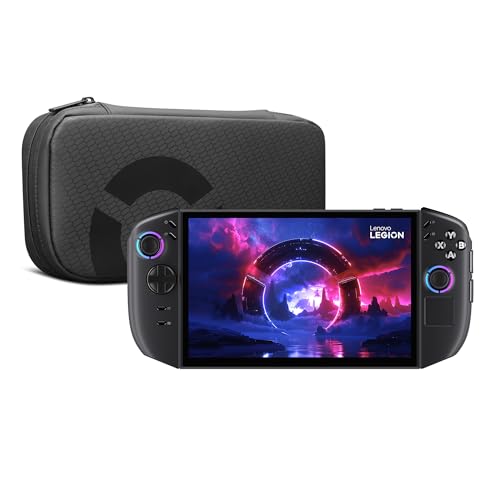
Lenovo Legion Go 2 Handheld Gaming PC
Best for: high-fidelity OLED handheld gaming
- Screen Resolution
- WQXGA (what this guide is about)
- Processor
- AMD Ryzen Z2
- RAM
- 16GB
- Storage
- 1TB
- Screen Size
- 8.8"
- Refresh Rate
- 144Hz
View on Amazon: Lenovo Legion Go 2 Handheld Gaming PC Affiliate link
The Lenovo Legion Go 2 is a mobile gaming console featuring an AMD Ryzen Z2 processor and an 8.8-inch WQXGA OLED display. It includes 16GB of RAM and a 1TB PCIe SSD for fast performance. The device supports 144Hz refresh rates and offers a 74Whr battery for extended play. It connects via Wi-Fi 6E and Bluetooth 5.3. This system suits players who want high-resolution visuals and detachable controllers for versatile gaming.
Pros
- 8.8-inch WQXGA OLED display with 144Hz refresh rate
- AMD Ryzen Z2 processor and 16GB RAM
- 1TB PCIe SSD storage capacity
- Detachable Truestrike controllers with mouse mode
- 74Whr battery for extended unplugged sessions
Cons
- 2.02 pounds weight is substantial for handheld use
- 11.7 inches length may reduce portability
- Integrated dual 2W speakers lack bass depth
Good fit if
- You prioritize high-resolution OLED visuals and fast refresh rates
- You want detachable controllers for mouse-like aiming in FPS games
- You need ample storage for large game libraries
Skip if
- You prefer a lighter device for extended carrying
- You require integrated controllers for maximum compactness
- You are sensitive to device weight during long sessions
Verdict: Lenovo Legion Go 2 8.8" OLED delivers high-end specs with its OLED panel and Ryzen Z2 chip. It fits gamers who value visual fidelity and versatile controller configurations over ultra-portability.

AYANEO GEEK 7-inch Touchscreen PC
Best for: native 800p handheld PC gaming
- Screen Resolution
- 1280 x 800 (what this guide is about)
- Processor
- AMD Ryzen 7 6800U
- RAM
- 16GB
- Storage
- 512GB
- Screen Size
- 7 Inches
- Display Type
- IPS
View on Amazon: AYANEO GEEK 7-inch Touchscreen PC Affiliate link
The AYANEO GEEK runs a 7-inch IPS touchscreen at a 1280 x 800 resolution with 323 PPI. This native 800p target requires less graphics power from the AMD Ryzen 7 6800U processor and Radeon 680M GPU than 1080p screens. With 16GB RAM, 512GB storage, and 100% sRGB color, it suits you if you prioritize native rendering efficiency over higher pixel density.
Pros
- 7-inch 1280 x 800 IPS display with 100% sRGB coverage
- AMD Ryzen 7 6800U with Radeon 680M graphics
- Two USB4 ports and one USB 3.2 Type-C port
- Micro SD card slot supports up to 2TB expansion
Cons
- 1280 x 800 resolution offers lower pixel count than 1080p panels
- Screen brightness is limited to 350 nits
- Base internal storage capacity is 512GB
Good fit if
- You prefer an 800p native display to reduce graphics workload.
- You want full 100% sRGB color coverage on a 7-inch screen.
Skip if
- You require a 1080p or higher resolution display.
- You need screen brightness higher than 350 nits.
Verdict: AYANEO GEEK 7-Inch Handheld PC delivers native 800p gaming on an integrated Radeon 680M chip without demanding the graphics horsepower required by higher-resolution panels.

Goovis G3 Max QHD Micro-OLED Headset
Best for: immersive high-res viewing with handhelds
- Screen Resolution
- QHD (what this guide is about)
- Refresh Rate
- 120Hz
- Display Type
- OLED
- Operating System
- Android
- Color
- Silver
- Platform
- PC, Mobile, PS5
View on Amazon: Goovis G3 Max QHD Micro-OLED Headset Affiliate link
The GOOVIS G3 Max is a head-mounted display featuring dual 2.5K Sony Micro-OLED screens. It delivers a 1000-inch virtual image with 120Hz refresh rate and 45 PPD clarity. The unit supports 3D content and connects via USB-C or HDMI. It suits you if you want an immersive, high-resolution screen for gaming or media on handhelds like the ROG Ally or Steam Deck.
Pros
- Dual 2.5K QHD Sony Micro-OLED displays
- 120Hz refresh rate for smooth motion
- 45 PPD clarity and 65-degree FOV
- Supports Blu-ray 3D and Side-by-Side formats
- Adjustable IPD from 58 to 74mm
Cons
- Requires external adapter for HDMI devices
- Not a standalone handheld gaming PC
- Limited to 65-degree field of view
Good fit if
- You want a massive virtual screen for handhelds
- You prioritize high resolution and 120Hz smoothness
- You want to watch 3D movies or play VR-style games
Skip if
- You need a standalone device without a host
- You prefer a traditional flat monitor setup
- You do not want to wear a headset
Verdict: The GOOVIS G3 Max QHD XR Headset offers exceptional clarity and refresh rates for immersive viewing. It is ideal for users who want to attach a high-resolution screen to their existing handheld gaming PC or console.
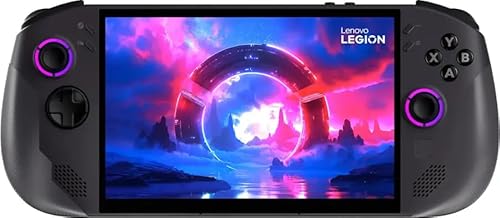
Lenovo Legion Go S 8" 120Hz
Best for: Large-screen portable gaming with high RAM
- Screen Resolution
- 1920 x 1200 (what this guide is about)
- Processor
- AMD Ryzen Z1 Extreme
- RAM
- 32GB
- Storage
- 1TB SSD
- Screen Size
- 8"
- Refresh Rate
- 120Hz
View on Amazon: Lenovo Legion Go S 8" 120Hz Affiliate link
The Lenovo Legion Go S features an AMD Ryzen Z1 Extreme processor paired with 32GB of RAM. It includes a 1TB SSD and an 8-inch WUXGA display with a 120Hz refresh rate. The device runs SteamOS and uses AMD Radeon graphics. This setup supports smooth gameplay for portable gaming. You get a high-resolution screen and ample storage for your library.
Pros
- AMD Ryzen Z1 Extreme processor for strong performance
- 32GB RAM for multitasking and heavy games
- 1TB SSD provides ample game storage
- 8-inch WUXGA display with 120Hz refresh rate
Cons
- 1920x1200 resolution is lower than 4K alternatives
- SteamOS may limit compatibility with non-Steam titles
- No mention of advanced thermal management features
Good fit if
- You want high RAM for smooth multitasking
- You prefer a large 8-inch screen
- You need a 1TB storage capacity
Skip if
- You require 4K resolution for maximum clarity
- You need Windows for specific non-Steam software
- You prefer a smaller, more portable form factor
Verdict: Lenovo Legion Go S 8-Inch Handheld is ideal for gamers who prioritize screen size and memory capacity. It suits those who want a large display and fast storage for their portable gaming setup.

ASUS ROG Ally 7 120Hz Ryzen Z1
Best for: Users wanting a larger 7-inch 120Hz Windows handheld
- Screen Resolution
- 1080p (what this guide is about)
- Processor
- AMD Ryzen Z1
- RAM
- 16GB LPDDR5
- Storage
- 512GB SSD
- Screen Size
- 7"
- Refresh Rate
- 120Hz
View on Amazon: ASUS ROG Ally 7 120Hz Ryzen Z1 Affiliate link
This handheld features a 7-inch 1080p touchscreen with a 120Hz refresh rate. It uses an AMD Ryzen Z1 processor and RDNA 3 graphics. You get 16GB of LPDDR5 RAM and 512GB of SSD storage. The device runs Windows 11. It weighs 2.89 pounds. This setup suits players who want desktop-class performance in a portable form factor.
Pros
- 7-inch FHD 1080p touchscreen display
- 120Hz refresh rate for smooth gameplay
- AMD Ryzen Z1 processor with RDNA 3 graphics
- 16GB LPDDR5 RAM and 512GB SSD
- Windows 11 compatibility for PC game libraries
Cons
- 2.89-pound weight is heavier than typical handhelds
- AMD Ryzen Z1 is less powerful than Z1 Extreme
- 1080p resolution is standard for this screen size
Good fit if
- You want a larger 7-inch screen for better visibility
- You need Windows 11 for PC game compatibility
- You prefer 120Hz smoothness in action titles
Skip if
- You prioritize maximum battery life over raw power
- You want the highest-end Z1 Extreme processor
- You need a lighter device under 2.5 pounds
Verdict: ASUS ROG Ally 7" 120Hz delivers solid 1080p 120Hz gaming with a Ryzen Z1 chip. It fits users who value screen size and Windows compatibility over ultra-portability.
Specifications side by side
| Spec | HIDevolution ASUS ROG Ally X 7" 120Hz | Lenovo Legion Go 2 Handheld Gaming PC | AYANEO GEEK 7-inch Touchscreen PC | Goovis G3 Max QHD Micro-OLED Headset | Lenovo Legion Go S 8" 120Hz | ASUS ROG Ally 7 120Hz Ryzen Z1 |
|---|---|---|---|---|---|---|
| Processor | AMD Ryzen Z1 Extreme | AMD Ryzen Z2 | AMD Ryzen 7 6800U | not stated | AMD Ryzen Z1 Extreme | AMD Ryzen Z1 |
| RAM | 24GB LPDDR5X | 16GB | 16GB | not stated | 32GB | 16GB LPDDR5 |
| Storage | 1TB PCIe SSD | 1TB | 512GB | not stated | 1TB SSD | 512GB SSD |
| Screen Size | 7" | 8.8" | 7 Inches | not stated | 8" | 7" |
| Refresh Rate | 120Hz | 144Hz | not stated | not stated | 120Hz | 120Hz |
| Display Type | IPS-Level | OLED | IPS | not stated | not stated | not stated |
| Resolution | 1920x1080 | WQXGA | 1280x800 | not stated | 1920x1200 | 1080p |
| Graphics | AMD Radeon Graphics | AMD Radeon Graphics | AMD Radeon 680M | not stated | AMD Radeon 780M | RDNA 3 graphics |
| Operating System | Windows 11 Home | not stated | not stated | not stated | SteamOS | Windows 11 |
| Storage Capacity | 1TB | 1TB | 512GB | not stated | 1TB | 512GB |
| Screen Resolution | 1080p | WQXGA | 1280 x 800 | QHD | 1920 x 1200 | 1080p |
| Color | 7" Fhd | Ryzen Z1 Extreme | Amd Radeon | 11 Home | Black | Black | Silver | Nebula Nocturne | White |
| Graphics Card | AMD Radeon | AMD Radeon | not stated | not stated | AMD Radeon | not stated |
| Memory | not stated | 16GB | 16GB | not stated | 32GB | 16GB |
| Platform | PC | Mobile | PC | PC, Mobile, PS5 | not stated | not stated |
| Dimensions | 11 × 4.37 × 1.45 inches | 11.7 × 5.39 × 1.65 inches | 10.4 × 4.13 × 1.42 inches | 9.13 × 8.39 × 4.41 inches | not stated | 11 × 4.4 × 0.8 inches |
| Weight | 1.49 pounds | 2.02 pounds | 3.51 pounds | not stated | not stated | 2.89 pounds |
| Size | 24 GB LPDDR5X RAM | 1 TB PCIe SSD | not stated | 16GB+512B-800P | not stated | not stated | not stated |
| Model | RC72LA-ALLYX.Z1X-HID1 | 83N10009US | AYANEO GEEK | ea3ad4db-e94a-4c04-b22d-2f3e152e2d44 | 8APU1 | ASUS ROG Ally 7 |
If you also compare home saunas, you can find their features explained through published heating and build specifications.
Frequently asked questions
What is the difference between 1080p and WQXGA screens?
1080p displays 1920 by 1080 pixels, offering a standard sharpness level. WQXGA provides a significantly higher pixel count, resulting in finer detail. The Lenovo Legion Go 2 uses a WQXGA OLED panel for enhanced visual fidelity. You will notice sharper textures on WQXGA, but it requires more processing power to maintain smooth frame rates compared to 1080p.
Does a higher resolution always mean better gaming performance?
No, higher resolution often reduces performance. Rendering more pixels demands more GPU power. The AYANEO GEEK uses a native 1280 x 800 resolution to reduce strain on its Radeon 680M chip. This allows for smoother gameplay without needing high-end graphics horsepower. You should choose lower resolutions if you prioritize frame rate over image sharpness.
Which handheld offers the best screen resolution for immersive viewing?
The Goovis G3 Max QHD Micro-OLED Headset offers QHD resolution for immersive viewing. It attaches to existing handhelds or consoles. The QHD resolution provides exceptional clarity compared to standard screens. This setup is ideal if you want high-resolution visuals without buying a new portable device. You get a private, high-detail display experience.
Is 1920 x 1200 resolution better than 1080p?
Yes, 1920 x 1200 offers more vertical pixels than 1080p. The Lenovo Legion Go S features this 1920 x 1200 resolution on an 8-inch screen. You gain slightly more screen real estate for games and interfaces. This resolution balances sharpness with performance, fitting users who want larger displays without jumping to 4K.
Can I connect an external high-resolution screen to my handheld?
Yes, devices like the Goovis G3 Max allow this. It is a QHD headset compatible with handhelds and consoles. You can attach it to view high-resolution content privately. This is useful if your handheld has a lower resolution but you want QHD visuals. It expands your viewing options without replacing your main device.
How does screen resolution affect battery life on handhelds?
Higher resolutions drain battery faster due to increased GPU load. The ASUS ROG Ally X uses 1080p to balance performance and battery. Lower resolutions like 1280 x 800 on the AYANEO GEEK further reduce power consumption. You will get longer play sessions with 1080p or lower settings compared to WQXGA or 4K outputs.