Pimax Crystal Light VR Headset Review: Who It Fits and Who Should Skip It
As an Amazon Associate we earn from qualifying purchases. Links on this page are affiliate links.
This pimax crystal light VR headset review examines a tethered PC VR headset built for demanding simulations and immersive games. Two core specifications define the unit: its 2880×2880 per-eye resolution with 35 PPD, and its QLED display featuring local dimming. You connect the hardware directly to your computer using the Pimax Play setup. The system includes bundled controllers and supports refresh rates of 72Hz, 90Hz, and 120Hz. Weighing 1.8 pounds, this model offers a 30 percent weight reduction compared to the standard Crystal while maintaining SteamVR compatibility for complex simulation titles.
What stands out
- 2880×2880 per-eye resolution with 35 PPD and AI upscaling
- QLED display with local dimming for high-contrast dark scenes
- Selectable refresh rates of 72Hz, 90Hz, and 120Hz
- Inside-out camera tracking with Lighthouse base station expansion options
- 1.8-pound total weight with balanced ergonomic distribution
Who it fits
Good fit for
This headset suits dedicated PC flight and racing simulator enthusiasts who prioritize visual clarity. If you run titles like Microsoft Flight Simulator or iRacing, the 2880×2880 per-eye resolution and 35 PPD render small cockpit instruments and text clearly. It also fits users needing flexible performance tuning, as you can adjust between 72Hz, 90Hz, and 120Hz modes to match your GPU output during long seated gaming sessions.
Who should skip it
You should skip this headset if you need a standalone or untethered wireless device. The specifications designate PC as the platform, requiring a wired connection to your computer and the Pimax Play software. If you play exclusively on consoles or want completely cable-free room movement without tethering, this hardware will not match your setup. It also does not serve users without a PC capable of driving high resolutions.
Verdict: The Pimax Crystal Light delivers high-density 2880×2880 visuals and local dimming for PC simulation enthusiasts who want crisp detail. Its combination of adjustable refresh rates and integrated inside-out tracking makes it a focused display upgrade for dedicated desk and cockpit rigs.
Key Specs and Real-World Meaning
72Hz, 90Hz, and 120Hz refresh rates
This setting lets you balance frame rates against system load. Flight sim pilots running heavy graphics can select 72Hz to keep frames consistent, while fast action players can use 120Hz. If you evaluate handheld gaming PCs to drive displays, compare this against the fixed 60Hz or 120Hz internal panels found on portable gaming devices.
Inside-out and Lighthouse tracking support
Dual tracking lets you play immediately using onboard cameras or add external base stations for precise controller monitoring. Sim racers needing simple desk setups benefit from the camera mode, while active room-scale players gain stability from base stations. When shopping handheld gaming PCs, compare this tracking flexibility to the fixed gyroscopes and sensors built into standard handheld units.
Weight: 1.8 pounds
At 1.8 pounds, this headset exerts less downward leverage on your neck during extended sessions. Flight and racing enthusiasts spending hours in cockpit simulations gain noticeable physical comfort. When comparing hardware across handheld gaming PCs, note that 1.8 pounds matches the total carry weight of large handheld consoles like full-sized PC gaming handhelds with integrated batteries.
AI upscaling
Onboard AI upscaling reconstructs video frames to increase clarity without overloading your graphics card. Gamers running complex simulators gain higher frame rates and legible instrument gauges. When you compare performance options on handheld gaming PCs, look at similar driver-level upscaling technologies like FSR or XeSS that handheld systems deploy to run modern PC releases smoothly on constrained power.
Physical Dimensions, Weight, and Hardware Build
The Pimax Crystal Light features a black finish and measures 15 inches in length, 12.5 inches in width, and 6.7 inches in height. At 1.8 pounds, it is 30 percent lighter than the original Crystal headset. According to the listing, the physical structure maintains a balanced weight distribution intended for extended sessions. In practice, this footprint requires you to maintain clear space around your desk or simulator so the outer casing does not bump nearby objects.
For tracking, the chassis integrates cameras that enable inside-out tracking directly through the headset frame. According to the listing, you can also expand the hardware with Lighthouse base station tracking if your current PC VR setup uses external sensors. This dual-tracking layout gives you flexibility between a self-contained camera array and an external base station configuration.
The package includes controllers, giving you physical hand inputs without acquiring separate devices. According to the listing, connecting the headset to your PC and completing room setup takes ten minutes through the Pimax Play software. This layout ensures you have all necessary physical controls ready for seated simulations or room-scale movement.
Setup Process and Daily Operation
Setting up the Pimax Crystal Light requires connecting the unit to your PC and opening the Pimax Play software. The program provides step-by-step instructions to complete your room setup in 10 minutes. For tracking, the headset uses integrated camera tracking straight from the box. This inside-out setup means you do not need external base stations to begin playing. If you prefer external tracking hardware later, the system supports expansion with Lighthouse base stations. The package includes controllers, giving you the necessary physical inputs for navigation and gameplay right away.
During daily use, the headset operates within the PC ecosystem with SteamVR compatibility. You can run standard VR releases such as Beat Saber, Half-Life: Alyx, and VRChat. The display system is also tailored for detailed simulation games, specifically Microsoft Flight Simulator and iRacing. To help your graphics card maintain performance, built-in AI upscaling boosts both frame rates and clarity for smoother high-FPS output. The hardware design also features balanced weight distribution to support extended sessions. If you encounter setup problems or software questions during routine use, Pimax provides one-on-one technical support along with customer service.
What to Check Before Buying
Before you choose this headset, verify your PC hardware matches its performance demands. The Pimax Crystal Light is a dedicated PC platform peripheral, not a standalone device like portable handheld gaming PCs. Handheld gaming machines run games on self-contained mobile hardware, but this headset relies completely on an external PC to process titles like Half-Life: Alyx and Microsoft Flight Simulator.
You need a compatible PC setup capable of running Steam VR across 72Hz, 90Hz, or 120Hz refresh modes. While inside-out camera tracking works directly out of the box, you need Lighthouse base stations if you choose to expand tracking. Wipe the tracking cameras regularly to prevent optical interference during daily use. Across 1 gaming options, this tethered headset targets stationary simulation rigs instead of on-the-go gaming.
Check before you buy
- Verify your PC hardware meets Steam VR software requirements.
- Check if your GPU supports 72Hz, 90Hz, or 120Hz refresh rates.
- Determine whether you need add-on Lighthouse base stations for tracking expansion.
- Ensure you have a stationary desk space instead of a mobile handheld setup.
The product at a glance
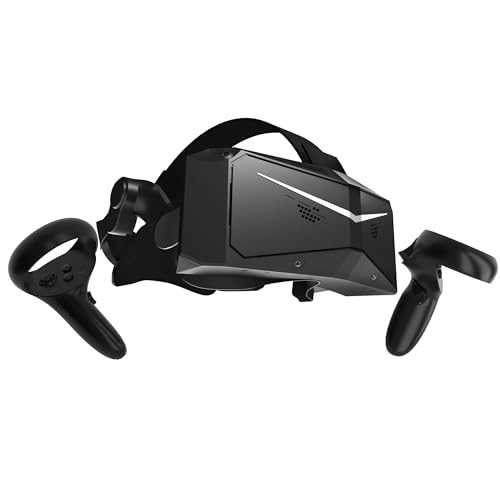
Pimax Crystal Light VR Headset
Best for: PC flight and racing simulator enthusiasts
- Display Resolution
- 2880×2880 per eye
- Refresh Rate
- 72Hz/90Hz/120Hz
- Display Type
- QLED
- Tracking Type
- Inside-Out, Base Station
- Color
- Black
- Platform
- PC
View on Amazon: Pimax Crystal Light VR Headset Affiliate link
The Pimax Crystal Light is a PC-tethered VR headset built for high-clarity simulation setups. It delivers 2880×2880 resolution per eye across a QLED panel with local dimming, reaching 35 PPD. You can toggle between 72Hz, 90Hz, and 120Hz refresh rates depending on your PC hardware. It suits seated flight and racing simulation players who require sharp text and cockpit dials.
Pros
- 2880×2880 per-eye resolution at 35 PPD for fine visual detail
- Selectable refresh rates of 72Hz, 90Hz, and 120Hz
- QLED display with local dimming for contrast in dark scenes
- Supports both inside-out camera tracking and base-station expansion
Cons
- Requires a tethered PC connection with no standalone mode
- Total weight of 1.8 pounds adds noticeable facial pressure
Good fit if
- You play PC flight or racing simulators that require reading small instrument gauges.
- You need selectable refresh rates up to 120Hz to match your graphics hardware.
Skip if
- You want a standalone wireless headset that functions without a PC.
- You prefer an ultralight headset under 1.8 pounds for active room-scale movement.
Verdict: Pimax Crystal Light QLED VR Headset delivers ultra-high-resolution rendering for PC gamers who prioritize fine in-game cockpit instrumentation over standalone mobility.
Specifications side by side
| Spec | Pimax Crystal Light VR Headset |
|---|---|
| Display Resolution | 2880×2880 per eye |
| Refresh Rate | 72Hz/90Hz/120Hz |
| Display Type | QLED |
| Tracking Type | Inside-Out, Base Station |
| Color | Black |
| Platform | PC |
| Dimensions | 15 × 12.5 × 6.7 inches |
| Weight | 1.8 pounds |
| Size | 14.17 |
| Model | Crystal Light Full Payment Version |
Frequently asked questions
Who is the Pimax Crystal Light VR Headset best for?
The Pimax Crystal Light is best for PC flight and racing simulator enthusiasts. You benefit from this device when you prioritize detailed in-game cockpit instrumentation during seated play. It targets desktop simulation users who want high visual fidelity rather than mobile, standalone flexibility.
Who should skip the Pimax Crystal Light VR Headset?
You should skip the Pimax Crystal Light if you want standalone portability or wire-free mobility. The headset operates exclusively on the PC platform. If you prefer self-contained mobile hardware that functions away from a desktop computer, this tethered simulation peripheral will not match your requirements.
Can the Pimax Crystal Light run games without a PC?
No, the Pimax Crystal Light cannot run games without a PC. The headset requires a direct PC platform connection to power its displays and render graphics. You cannot operate it away from your computer because the hardware is engineered exclusively for tethered desktop VR setups.
How much does the Pimax Crystal Light VR Headset weigh?
The Pimax Crystal Light VR Headset weighs 1.8 pounds. You will find that this 1.8-pound weight rests on your head during simulation gameplay. This mass provides a stable physical footprint when you remain seated in your racing cockpit or flight simulator chair.
What color is the Pimax Crystal Light VR Headset?
The Pimax Crystal Light VR Headset comes in black. The outer casing features a uniform black color scheme across its exterior chassis. You can easily integrate this finish into your existing PC setup, as black matches standard computer components, monitors, and flight yoke accessories.
What are the dimensions of the Pimax Crystal Light?
The Pimax Crystal Light measures 15 inches long, 12.5 inches wide, and 6.7 inches high, with a size rating of 14.17. You should measure your available desk space or storage area to confirm you have enough clearance to store the headset between your PC gaming sessions.
What model edition is the Pimax Crystal Light?
The Pimax Crystal Light is listed as the Crystal Light Full Payment Version. Pimax manufactures this specific hardware model for PC simulation gamers. When you acquire this version, you receive the designated black unit built for high-detail PC virtual reality use.