Pimax Crystal Light QLED VR Review: Specs, Pros and Cons
As an Amazon Associate we earn from qualifying purchases. Links on this page are affiliate links.
This pimax crystal light QLED VR review covers a headset built for high-fidelity virtual reality on PC. It features a 2880x2880 resolution per eye display and uses QLED technology with local dimming. These two specs define its visual performance, aiming for sharp clarity and vivid contrast. The device also includes glass aspheric lenses and supports up to 120Hz refresh rates. It relies on inside-out tracking and weighs approximately 815 grams. This guide explains how these specifications translate to your gaming experience.
What stands out
- 2880x2880 resolution per eye for 16.6 million total pixels
- QLED display with local dimming and HDR support
- Glass aspheric lenses for edge-to-edge clarity
- Up to 120Hz refresh rate for low latency
- Fixed 2.0 foveated rendering technology
Who it fits
Good fit for
This headset suits PC users who already have a SteamVR setup and want high visual fidelity. If you value sharp text and detailed textures, the per-eye resolution helps. The inside-out tracking works well in open spaces without external sensors. It also fits users who prefer QLED color accuracy and high contrast. The 120Hz refresh rate benefits those playing fast-paced simulations where fluid motion matters.
Who should skip it
Look at another option if you need a standalone device, as this model requires a PC. Users seeking wireless freedom will find this tethered setup limiting. Those with small play areas might struggle with the inside-out camera range. If you prefer lighter headsets, the 815-gram weight may feel heavy during long sessions. It is also not ideal if you need external tracking for complex room-scale setups.
Verdict: The Pimax Crystal Light QLED VR headset delivers high-resolution visuals and low latency for PC users. It is a strong choice for those prioritizing display quality and ease of setup.
Key specs for Pimax Crystal Light
2880x2880 per eye resolution
This resolution provides 2880 pixels horizontally and vertically for each eye. You see more detail than standard 4K monitors. This reduces the screen door effect, making text and textures sharper. It is essential for immersive VR where clarity matters. Compare this to lower resolution headsets that may appear pixelated. Higher resolution improves realism in complex environments.
QLED display with local dimming
QLED technology uses quantum dots for vibrant colors and high brightness. Local dimming allows the display to darken specific areas independently. This creates deeper blacks and higher contrast ratios. You notice better depth in dark scenes and richer colors in bright ones. This feature enhances visual fidelity compared to standard LCD panels without local dimming capabilities.
Up to 120Hz refresh rate
The display updates the image up to 120 times per second. Higher refresh rates reduce motion blur and lag. You experience smoother movement during fast-paced actions. This minimizes the disconnect between your head movements and the visual feedback. It is crucial for comfort and reducing motion sickness. Compare this to 90Hz or lower rates for a smoother experience.
Inside-Out Camera Tracking
Built-in cameras track your position and movements without external sensors. You do not need to set up base stations or external trackers. This simplifies setup and allows use in any open space. It ensures accurate positioning within your VR environment. This feature offers convenience compared to systems requiring external hardware for tracking.
Design and build details
The Pimax Crystal Light QLED VR Headset weighs 1.8 pounds, or approximately 815 grams. This mass is distributed through an ergonomic design. The listing states this balance allows for long-term use without burden. You can wear it for extended sessions without excessive strain on your neck or face. The exterior finish is black, providing a neutral look that blends with most gaming setups. There are no bright accents or flashy materials mentioned in the data.
Inside, the headset relies on glass aspheric lenses. These lenses sit directly in front of the QLED display. They provide edge-to-edge clarity and reduce distortion. This optical layout ensures you see sharp images across the entire field of view. The inside-out camera tracking system is integrated into the front shell. It captures your movements without requiring external base stations. This simplifies setup in smaller rooms.
Compatibility is handled through standard PC connections. The device integrates with SteamVR setups. It works with controllers like the Valve Index Knuckles or HTC VIVE. This modular approach means you can swap input devices based on preference. The design prioritizes function over form. It is a tool for simulation and gaming, not a fashion accessory. The layout keeps cables and sensors accessible. You can adjust the fit for your specific head shape. According to the listing, the weight distribution is key to comfort.
Setup and Daily Use Guide
This headset connects to your PC. It integrates with your existing SteamVR setup. You can use controllers like the Valve Index Knuckles or HTC VIVE. The device uses inside-out camera tracking. This means no external sensors are needed for movement. The system tracks your position in any VR space. This simplifies your initial room setup. You place the headset on and begin. The visual experience relies on 2880x2880 resolution per eye. The QLED display supports local dimming and HDR. This provides high contrast and vivid colors. Glass aspheric lenses deliver edge-to-edge clarity. They reduce distortion across the field of view. Latency is kept low with support for up to 120Hz refresh rates. This creates a fluid and responsive VR environment. Foveated Rendering 2.0 is built in. This fixed technology optimizes performance. It renders high detail only where you look. Peripheral areas maintain efficiency. This helps manage system load during heavy scenes. The weight is 1.8 pounds. The ergonomic design distributes this mass. You can wear it for long sessions without burden. The platform is strictly PC. You need a compatible computer to run the software. The color is black. The model is the Full Payment Version. Daily use involves launching your preferred VR applications. The tracking responds to your movements. The display updates rapidly to match your head turns. You see sharp images with minimal lag. The setup is straightforward if you have the right PC hardware. You pair your controllers and start playing.
Before You Buy This VR Headset
You need a PC that meets SteamVR requirements. This headset does not work with consoles. Check your GPU power supply and cables. The device uses inside-out tracking. You do not need external base stations. This simplifies your play area. You can use existing controllers like Valve Index Knuckles. Your setup must support local dimming for HDR. This feature enhances contrast and color depth. The 120Hz refresh rate reduces lag. Ensure your PC can handle this high frame rate. Foveated rendering helps performance by focusing detail where you look. This technology optimizes efficiency. The headset weighs 1.8 pounds. This mass requires a sturdy strap. Clean the glass lenses regularly. Use a microfiber cloth. Avoid harsh chemicals. Dust can scratch the surface. Keep the inside-out cameras clear. Obstructions block tracking. This option suits users who want high clarity. It fits among other PC VR choices. You get QLED visuals without extra sensors. Verify your Steam library supports these specs. Prepare your space for movement.
Check before you buy
- Verify your PC meets SteamVR minimum requirements for 120Hz.
- Confirm your GPU supports local dimming and HDR output.
- Check that your play area is clear for inside-out tracking.
- Ensure you have compatible controllers like Valve Index Knuckles.
The product at a glance
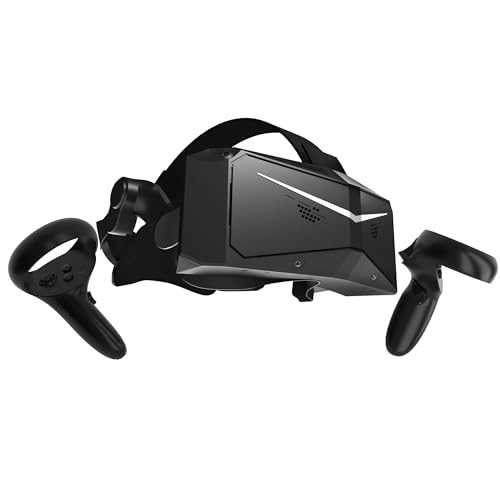
Pimax Crystal Light QLED VR Headset
Best for: high-resolution PC VR simulations
- Display Resolution
- 2880x2880 per eye
- Refresh Rate
- 120Hz
- Display Type
- QLED
- Tracking Type
- Inside-Out
- Color
- Black
- Platform
- PC
View on Amazon: Pimax Crystal Light QLED VR Headset Affiliate link
The Pimax Crystal Light is a PC VR headset featuring a 2880x2880 per eye QLED display with local dimming. It offers up to 120Hz refresh rates and glass aspheric lenses for edge-to-edge clarity. Weighing approximately 815 grams, it uses inside-out tracking and supports foveated rendering. This headset suits users seeking high visual fidelity and low latency for immersive simulations on SteamVR.
Pros
- 2880x2880 resolution per eye with 16.6 million pixels
- QLED display with local dimming and HDR support
- Up to 120Hz refresh rate for ultra-low latency
- Glass aspheric lenses reduce distortion
Cons
- Weight of 815 grams may cause fatigue
- Foveated rendering is fixed at version 2.0
- Requires PC and SteamVR setup
Good fit if
- You want high-resolution visuals with QLED technology
- You prioritize low latency for simulations
- You use SteamVR compatible controllers
Skip if
- You need a lightweight headset under 700 grams
- You prefer wireless standalone operation
- You want adjustable foveated rendering settings
Verdict: Pimax Crystal Light QLED VR Headset fits users who demand high-resolution QLED visuals and low latency for PC VR simulations, though the weight and fixed foveated rendering may limit comfort and customization.
Specifications side by side
| Spec | Pimax Crystal Light QLED VR Headset |
|---|---|
| Display Resolution | 2880x2880 per eye |
| Refresh Rate | 120Hz |
| Display Type | QLED |
| Tracking Type | Inside-Out |
| Color | Black |
| Platform | PC |
| Weight | 1.8 pounds |
| Model | Full Payment Version |
Frequently asked questions
Is the Pimax Crystal Light QLED VR Headset compatible with consoles?
No, this headset is designed exclusively for PC use. The product data specifies the platform as PC, meaning it will not connect to PlayStation or Xbox systems. You must have a compatible computer to use this device for virtual reality gaming or simulations.
How heavy is the Pimax Crystal Light QLED VR Headset?
The headset weighs 1.8 pounds. This specific mass is distributed through an ergonomic design to help balance the device on your face. This weight distribution aims to allow for longer wearing sessions without causing excessive neck strain or discomfort during intense gameplay.
What tracking method does the Pimax Crystal Light use?
It utilizes inside-out camera tracking technology. This feature eliminates the need for external base stations or sensors placed around your room. You only need to connect the headset to your PC, and the built-in cameras handle movement detection and spatial mapping automatically.
Which controllers work with the Pimax Crystal Light QLED VR Headset?
You can use controllers like the Valve Index Knuckles or HTC VIVE with this headset. It integrates with your existing SteamVR setup, allowing flexibility in choosing input devices. This compatibility ensures you can use familiar controllers for navigation and interaction within virtual environments.
What is the display resolution for each eye on this headset?
Each eye receives a 2880x2880 resolution display. This high pixel count provides sharp clarity and reduces the screen door effect compared to lower-resolution headsets. The QLED technology with local dimming further enhances contrast and color vibrancy for a more immersive visual experience on your PC.
Is the Pimax Crystal Light QLED VR Headset suitable for simulations?
Yes, it is best for high-resolution PC VR simulations. The combination of high resolution and QLED visuals supports detailed environments required for simulation work. The low latency ensures responsive interactions, making it a strong choice for users demanding precision and visual fidelity in their virtual experiences.
Does the Pimax Crystal Light QLED VR Headset require external sensors?
No, external sensors are not required. The device uses inside-out tracking, which relies on cameras built into the headset itself. This simplifies your setup process, as you do not need to place or calibrate base stations around your play area, saving space and effort.