Celonix Cyberdeck uConsole Kit Raspberry Review: Who It Fits and Who Should Skip It
As an Amazon Associate we earn from qualifying purchases. Links on this page are affiliate links.
This celonix cyberdeck uconsole kit raspberry review covers a modular handheld designed for Linux enthusiasts. You build your own portable device by inserting a Raspberry Pi CM4 into the Rev.5 mainboard. The unit features a 5-inch IPS display and a backlit QWERTY keyboard. It is a black, aluminum enclosure that turns development hardware into a compact terminal. This kit includes the screen, keyboard, battery module, and dual speakers. It is not a pre-loaded game console. It is a tool for coding, networking, and DIY electronics projects.
What stands out
- 5-inch HD IPS display for clear mobile viewing
- Backlit QWERTY keyboard for comfortable typing on the go
- ClockworkPi v3.14 Rev.5 mainboard with improved stability
- WiFi and 4G LTE expansion capability for remote access
- Modular aluminum enclosure with dual speakers and rechargeable battery
Who it fits
Good fit for
This kit suits developers, penetration testers, and network engineers who need a portable Linux terminal. If you use Raspberry Pi Compute Module 4 for embedded development or IoT projects, this form factor helps. It is ideal for retro computing and SDR applications where a dedicated screen and keyboard are useful. You will appreciate the backlit keyboard and compact 8x3x1 inch design for field work or travel.
Who should skip it
You should skip this if you want a plug-and-play gaming handheld. The device runs Linux and requires you to supply your own CM4 and microSD card. It is not a pre-configured entertainment system. If you need Windows compatibility or out-of-the-box game libraries, this is not for you. You must assemble the unit yourself using the included tools. It is a builder’s kit, not a finished consumer product.
Verdict: The Celonix uConsole is a robust, modular Linux handheld for developers who value portability and physical keys. It is not for casual gamers or users seeking a ready-to-use entertainment device.
Key specs explained
Screen Size: 5"
You get a five-inch diagonal display. This size offers a balance between portability and readability. It is compact enough for one-handed use but large enough for coding or terminal work. When comparing handheld gaming PCs, you will find many larger screens. This smaller form factor suits those who prioritize carrying the device in a pocket or small bag during travel or fieldwork.
Display Type: IPS
The screen uses In-Plane Switching technology. This ensures accurate colors and wide viewing angles. You can see the content clearly even if you tilt the device or view it from the side. This is important for handheld devices used in various positions. It provides a better visual experience than older TN panels, making text and code easier to read for extended periods without eye strain.
Operating System: Linux
The device runs Linux by default. This open-source platform is ideal for developers, programmers, and cybersecurity professionals. It offers full command-line access and compatibility with development tools. You do not get Windows or standard gaming consoles. This suits users who need a portable terminal for scripting, network testing, or embedded development. It is less suitable for users seeking plug-and-play commercial gaming libraries.
Color: Black
The enclosure is finished in black. This is a standard, professional color choice for technical equipment. It helps hide fingerprints and minor scuffs that occur during regular handling. While it does not affect performance, it contributes to a sleek, utilitarian aesthetic. This neutral tone blends well with other tech gear. It is a practical choice for users who want a device that looks like a serious tool rather than a toy.
Design and build quality
The Celonix uConsole Kit features a modular aluminum enclosure. The listing describes the finish as black. This material choice suggests a focus on durability and heat dissipation for a device that handles active computing tasks. You assemble the unit yourself, which allows you to customize the internal components while maintaining a consistent external structure. The design prioritizes function over flashy aesthetics, resulting in a utilitarian look that suits developers and makers.
According to the listing, the physical dimensions are 8 inches in height, 3 inches in length, and 1 inch in width. These measurements indicate a slim, vertical form factor. The compact footprint makes it easy to slip into a bag or hold in one hand during extended coding sessions. The thin profile ensures it does not take up excessive desk space when used as a portable terminal.
The layout centers around a 5-inch IPS display and a backlit QWERTY keyboard. The keyboard is integrated into the lower section of the aluminum frame. This arrangement places the input controls directly below the screen, mimicking a traditional laptop style but in a handheld format. The modular nature means you can swap or upgrade parts, such as the mainboard or battery module, without replacing the entire shell. This approach extends the device's lifespan for technical users who frequently update their hardware.
Setup and daily operation overview
Setting up the Celonix uConsole Kit requires you to assemble the hardware yourself. You insert a Raspberry Pi Compute Module 4 into the ClockworkPi v3.14 Rev.5 mainboard. The kit includes the mainboard, a CM4 adapter, and all necessary brackets. You also receive the five-inch IPS display, a backlit QWERTY keyboard, dual speakers, and the modular aluminum enclosure. You must provide your own 18650 batteries, as these are not included. The non-core kit does not include the Raspberry Pi CM4 or a 32GB microSD card. You will need to source these components separately to complete the build. The assembly tools are provided to help you construct the device. Once built, the unit runs Linux. The operating system is not pre-installed on the kit itself. You install it on the CM4 or the SD card. Daily use involves holding the device in one hand. The five-inch display offers a compact view. The backlit keyboard allows for typing in low light. The device supports WiFi and includes a module for 4G LTE expansion. This connectivity lets you use the handheld remotely or for network tasks. The dual speakers provide audio output. The modular design means you can access internal components if needed. You use this device for programming, cybersecurity, or embedded projects. It serves as a portable terminal for developers. The black finish and aluminum body suggest a focus on utility. You carry it easily due to its small dimensions. The setup process is straightforward if you are familiar with Raspberry Pi hardware. You connect the display and keyboard to the mainboard. You insert the batteries into the module. You then boot the Linux system. The device is ready for immediate use in your workflow.
Before You Buy This Kit
This kit is not a plug-and-play gaming handheld. You must supply the Raspberry Pi CM4 and a 32GB microSD card yourself. The listing explicitly states these are not included in the Non-Core Kit. You also need to provide 18650 batteries for the rechargeable module. This assembly approach suits makers and Linux developers who want a portable terminal for coding, networking, or cybersecurity tasks. It does not replace standard handheld gaming PCs for playing commercial games out of the box. You should verify your CM4 variant compatibility before purchasing. The modular design allows for future upgrades, such as adding WiFi or 4G LTE modules. Maintenance involves keeping the aluminum enclosure clean and ensuring your Linux environment remains updated. This device fits best for users who prioritize customization and portability over immediate gaming readiness. It sits apart from typical gaming handhelds, offering a specialized tool for technical work rather than entertainment.
Check before you buy
- Confirm you have a compatible Raspberry Pi CM4 module.
- Purchase separate 18650 batteries for the rechargeable module.
- Ensure you have a 32GB or larger microSD card.
- Verify your Linux skills match the assembly requirements.
The product at a glance
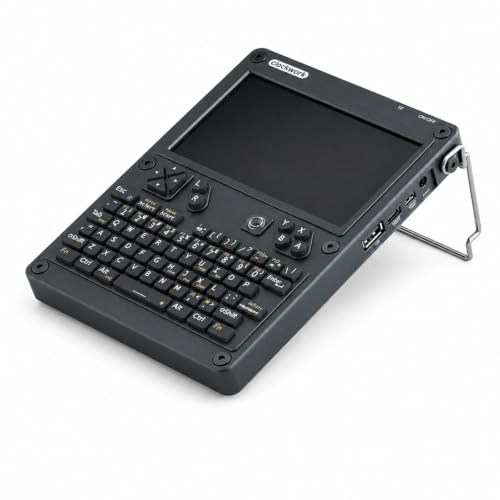
Celonix uConsole 5-inch Linux Handheld
Best for: portable Linux development and networking
- Screen Size
- 5"
- Display Type
- IPS
- Operating System
- Linux
- Color
- Black
- Dimensions
- 3 × 1 × 8 inches
View on Amazon: Celonix uConsole 5-inch Linux Handheld Affiliate link
This kit turns a Raspberry Pi CM4 into a handheld Linux computer. It features a 5-inch IPS display, a backlit QWERTY keyboard, and a modular aluminum enclosure. The Rev.5 mainboard supports WiFi and 4G LTE expansion. It includes dual speakers and a rechargeable battery module. You get assembly tools and antennas. It suits developers, makers, and Linux enthusiasts who need a portable terminal for programming or networking tasks.
Pros
- 5-inch HD IPS display
- Backlit QWERTY keyboard
- Modular aluminum enclosure
- Supports WiFi and 4G LTE expansion
- Includes dual speakers and battery module
Cons
- Raspberry Pi CM4 and microSD card not included
- 18650 batteries not included
- Requires assembly using provided tools
Good fit if
- You are a developer or maker needing a portable Linux terminal
- You want to customize your handheld with a Raspberry Pi CM4
- You need WiFi and 4G LTE expansion capabilities
Skip if
- You want a plug-and-play device without assembly
- You do not already own a Raspberry Pi CM4
- You prefer Windows or macOS over Linux
Verdict: Celonix Cyberdeck uConsole Kit is a modular handheld Linux computer designed for developers and makers. You should buy it if you need a portable terminal for programming, networking, or IoT projects and already have the necessary Raspberry Pi components.
Specifications side by side
| Spec | Celonix uConsole 5-inch Linux Handheld |
|---|---|
| Screen Size | 5" |
| Display Type | IPS |
| Operating System | Linux |
| Color | Black |
| Dimensions | 3 × 1 × 8 inches |
Frequently asked questions
Can I use this kit for handheld gaming?
This device is not designed for mainstream gaming. It is a modular Linux computer built for developers and makers. You should buy it if you need a portable terminal for programming, networking, or IoT projects. It is not a plug-and-play gaming handheld.
Does the package include the Raspberry Pi module?
No, the Raspberry Pi Compute Module 4 is not included. You must supply the CM4 and a 32GB microSD card yourself. The listing explicitly states these items are not part of the Non-Core Kit. You also need to provide 18650 batteries for the rechargeable module.
What kind of display does the Celonix uConsole have?
It features a five-inch diagonal IPS display. This size offers a balance between portability and readability. It is compact enough for one-handed use but large enough for coding or terminal work. The screen provides a clear view for your development tasks.
How large is the handheld unit?
The device measures 8 inches in height, 3 inches in length, and 1 inch in width. These dimensions create a compact form factor suitable for carrying in a bag. The black finish is applied to the aluminum enclosure for a professional look.
Is the keyboard backlit?
Yes, the unit includes a backlit QWERTY keyboard. This feature allows you to type comfortably in low-light environments. It is useful for coding sessions or terminal operations when you are working in dark rooms or during evening hours.
Who is this product best suited for?
It is best for portable Linux development and networking tasks. You should buy it if you need a portable terminal for programming or IoT projects. It is ideal for users who already have the necessary Raspberry Pi components and want a modular design.
What is the mainboard version used in this kit?
The kit uses the ClockworkPi v3.14 Rev.5 mainboard. You insert the Raspberry Pi CM4 into this specific board to build your device. The listing includes the mainboard, a CM4 adapter, and all necessary brackets for assembly. This ensures compatibility with the module.