Celonix uConsole Kit Raspberry Pi or Celonix Cyberdeck uConsole Kit Raspberry? Which Celonix Model to Buy
As an Amazon Associate we earn from qualifying purchases. Links on this page are affiliate links.
You are looking at the celonix uconsole kit raspberry pi vs cyberdeck uconsole kit raspberry. Both are barebones handheld Linux computers built around the Raspberry Pi CM4 and the ClockworkPi v3.14 Rev.5 mainboard. They share a 5-inch IPS display and a QWERTY keyboard layout. The main difference lies in the connectivity and included components. One model offers a 4G LTE option, while the other includes a full battery module and more assembly hardware in the box.
Key differences
| Aspect | Celonix uConsole 5-Inch Handheld | Celonix uConsole 5-inch Linux Handheld |
|---|---|---|
| Connectivity | WiFi Only or WiFi + 4G LTE | WiFi + 4G LTE included |
| Color | Silver | Black |
| Included Components | Mainboard and enclosure only | Mainboard, enclosure, battery module, tools, and antennas |
| Weight | 1.76 pounds | not listed |
Which one should you choose?
Choose Celonix uConsole 5-Inch Handheld if
- You prefer a silver finish for your device.
- You want to select your own connectivity configuration.
Choose Celonix uConsole 5-inch Linux Handheld if
- You want a complete kit with a battery module and tools.
- You prefer a black color scheme.
Verdict: The first option suits you if you want a lighter, silver unit and prefer to pick your own connectivity. The second option is better if you want a ready-to-assemble black kit with a battery module and all necessary tools included.
Celonix uConsole Kit vs Cyberdeck
Included components
The Celonix Cyberdeck uConsole Kit includes a battery module, dual speakers, enclosure, brackets, assembly tools, WiFi antenna, and the WiFi + 4G LTE module. It explicitly lists these items as part of the package. The standard uConsole Kit description focuses on the barebones nature and mentions multiple configurations. It does not list the battery module, speakers, or assembly tools in its feature list. This suggests the standard kit may require you to source or add these components separately. If you want a more complete starting point with power and audio included, the Cyberdeck model provides more hardware out of the box.
Connectivity options
Both kits support the ClockworkPi v3.14 Rev.5 mainboard, which allows for modular expansion. The standard uConsole Kit offers a choice between a WiFi-only configuration or a WiFi + 4G LTE option. You select this at purchase. The Cyberdeck uConsole Kit includes the WiFi + 4G LTE module as a standard included component. It also provides the necessary WiFi antenna. This means the Cyberdeck model comes ready for cellular connectivity immediately. If you plan to use 4G LTE, the Cyberdeck saves you the step of verifying compatibility and adding the module separately.
Display specifications
Both handhelds feature a 5-inch IPS display. The Celonix uConsole Kit lists this as a 5-inch IPS screen. The Cyberdeck uConsole Kit also specifies a 5-inch IPS display, noting it is HD. Both products share the same screen size and panel type. There is no difference in the core display technology or dimensions between the two models. You get the same visual experience regardless of which kit you choose. The aspect ratio and pixel density are not specified in the data, so we cannot distinguish them further. For visual output, they are identical.
Physical dimensions
The standard uConsole Kit lists a weight of 1.76 pounds. It does not provide length, width, or height measurements. The Cyberdeck uConsole Kit provides specific dimensions: 8 inches in height, 3 inches in length, and 1 inch in width. It does not list a weight. Knowing the exact footprint helps you plan for cases or transport. The Cyberdeck model gives you precise measurements for the enclosure. The standard kit only gives weight, which includes the barebones kit but excludes the CM4 and batteries. The Cyberdeck data is more specific about the form factor size.
Color options
The standard uConsole Kit is available in Silver. The Cyberdeck uConsole Kit is listed as Black. Both are aluminum enclosures based on the modular design. The color choice is purely aesthetic. Both models use the same ClockworkPi mainboard and Raspberry Pi CM4 adapter. The internal components and layout remain the same. You choose based on your preference for Silver or Black. There is no performance or functional difference tied to the color. This is a simple visual distinction between the two available kits.
Which Celonix Model Fits Your Needs
Developers needing cellular connectivity
The Cyberdeck kit includes the WiFi plus 4G LTE module, antenna, and all necessary brackets. You get a complete package with the battery module and dual speakers. This model supports portable computing anywhere without relying on local WiFi networks for every task.
Users wanting a lighter build
The standard uConsole Kit weighs 1.76 pounds. It offers a silver finish and a compact handheld design. You choose the WiFi-only configuration if you do not need cellular data. This version focuses on the core handheld experience with a mini trackball and QWERTY layout.
Makers seeking a complete kit
This Cyberdeck model provides a modular aluminum enclosure, assembly tools, and the Rev.5 mainboard. It explicitly lists the battery module and WiFi antenna as included items. You save time by receiving more components compared to the barebones standard kit, which requires separate purchases for full functionality.
The products compared

Celonix uConsole 5-Inch Handheld
Best for: DIY Linux handheld builders with CM4 modules
- Screen Size
- 5 Inch
- Display Type
- IPS
- Color
- Silver
- Weight
- 1.76 pounds
View on Amazon: Celonix uConsole 5-Inch Handheld Affiliate link
This Celonix barebones kit lets you build a portable Linux handheld using your own Raspberry Pi CM4 module. It features a 5-inch IPS display, a compact QWERTY keyboard, and a mini trackball. You can choose between WiFi-only or WiFi plus 4G LTE configurations. The silver chassis weighs 1.76 pounds. It is designed for users who want a cyberdeck-style layout with integrated speakers.
Pros
- 5-inch IPS display for clear visuals
- Compact QWERTY keyboard and mini trackball
- Optional WiFi + 4G LTE connectivity
- Supports ClockworkPi v3.14 Rev 5 mainboard
Cons
- Requires separate purchase of Raspberry Pi CM4 module
- Does not include 18650 batteries or TF card
- Heavier at 1.76 pounds compared to lighter alternatives
Good fit if
- You already own a Raspberry Pi CM4 module
- You want a physical QWERTY keyboard for typing
- You need optional 4G LTE cellular connectivity
Skip if
- You prefer a plug-and-play device without assembly
- You want a lighter handheld under 1.5 pounds
- You do not plan to install Linux yourself
Verdict: Celonix uConsole Kit 5-Inch IPS is a solid build for makers who want to customize their own Linux handheld with a physical keyboard and optional cellular data.
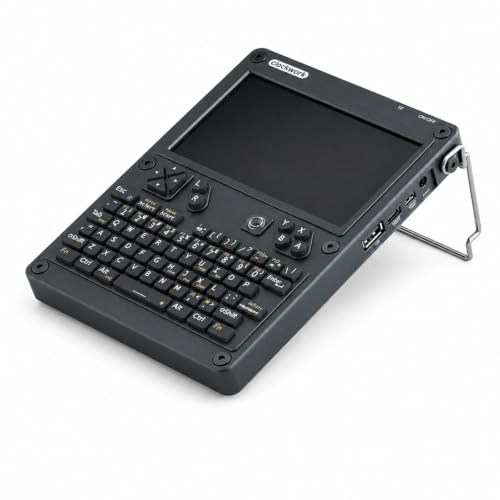
Celonix uConsole 5-inch Linux Handheld
Best for: portable Linux coding and networking projects
- Screen Size
- 5"
- Display Type
- IPS
- Operating System
- Linux
- Color
- Black
- Dimensions
- 3 × 1 × 8 inches
View on Amazon: Celonix uConsole 5-inch Linux Handheld Affiliate link
This kit transforms a Raspberry Pi CM4 into a portable Linux computer. It features a 5-inch IPS display, a backlit QWERTY keyboard, and a modular aluminum enclosure. The Rev.5 mainboard supports WiFi and 4G LTE expansion. It includes dual speakers and a rechargeable battery module. This setup suits developers and makers who need a compact terminal for coding, networking, or cybersecurity tasks.
Pros
- 5-inch IPS display for clear visuals
- Backlit QWERTY keyboard for typing
- Modular aluminum enclosure design
- Supports WiFi and 4G LTE expansion
Cons
- Requires separate purchase of Raspberry Pi CM4
- Does not include 18650 batteries
- Non-Core Kit lacks 32GB microSD card
Good fit if
- You want a portable Linux terminal for development
- You need a backlit keyboard for coding in low light
- You plan to use WiFi or 4G LTE connectivity
Skip if
- You need a pre-assembled computer without a CM4
- You require included batteries for immediate use
- You prefer a larger screen than 5 inches
Verdict: Celonix Cyberdeck uConsole Kit provides a modular, portable Linux experience with a 5-inch IPS display and backlit keyboard. It fits developers who want to build a custom handheld terminal for coding or networking.
Specifications side by side
| Spec | Celonix uConsole 5-Inch Handheld | Celonix uConsole 5-inch Linux Handheld |
|---|---|---|
| Screen Size | 5 Inch | 5" |
| Display Type | IPS | IPS |
| Operating System | not stated | Linux |
| Color | Silver | Black |
| Weight | 1.76 pounds | not stated |
| Dimensions | not stated | 3 × 1 × 8 inches |
| Size | WiFi Only | not stated |
Frequently asked questions
Does the Celonix uConsole 5-Inch Handheld include a battery?
The product data for the standard uConsole Kit does not list a battery module in its included components. You likely need to source power separately or use a compatible external pack. In contrast, the Cyberdeck model explicitly includes a battery module as part of the package, making it ready for portable use out of the box without extra purchases.
What is the weight difference between the two models?
The standard uConsole 5-Inch Handheld weighs 1.76 pounds. The Cyberdeck model specifications list physical dimensions of 3 inches by 8 inches by 1 inch but do not provide a weight figure. You can assume the Cyberdeck includes additional components like the battery and dual speakers, which may affect its final weight compared to the lighter standard kit.
Which model is better for cellular connectivity?
The Celonix Cyberdeck uConsole Kit is the better choice if you need cellular data. It explicitly includes a WiFi plus 4G LTE module and the necessary antenna. The standard uConsole 5-Inch Handheld is described as WiFi Only. If you require portable internet access away from WiFi networks, the Cyberdeck provides the necessary hardware integration.
Are both devices black or silver?
The models come in different colors. The standard uConsole 5-Inch Handheld is available in Silver. The Celonix Cyberdeck uConsole Kit is listed in Black. Both units feature a 5-inch IPS display and a QWERTY keyboard layout. You should choose based on your preferred color aesthetic since both share the same core display technology and input method.
Is the keyboard backlit on both models?
The Cyberdeck model description mentions it features a backlit keyboard. The standard uConsole 5-Inch Handheld listing does not specify whether the keyboard is backlit or not. Both share a QWERTY layout. If backlighting is essential for your coding or gaming sessions in low light, the Cyberdeck explicitly confirms this feature, while the standard kit leaves it undefined.
Does the Cyberdeck kit come with speakers?
Yes, the Celonix Cyberdeck uConsole Kit includes dual speakers as part of its included components. The standard uConsole 5-Inch Handheld product data does not mention audio hardware. If you want built-in sound output for games or media playback without adding external accessories, the Cyberdeck provides the dual speakers directly in the box.
Can I use the standard kit with a Raspberry Pi CM4?
Yes, the standard uConsole 5-Inch Handheld is designed for DIY Linux handheld builders using CM4 modules. It is a barebones kit intended for customization. You will need to provide your own CM4 module. This model allows you to build your own system, whereas the Cyberdeck offers a more complete package with pre-integrated components like the battery and LTE module.