WEELIAO OneXPlayer X1 Air Review: Specs, Pros and Cons
As an Amazon Associate we earn from qualifying purchases. Links on this page are affiliate links.
This weeliao onexplayer x1 air review breaks down a 3-in-1 handheld PC that blends gaming, creation, and work. It features an Intel Core Ultra 7 258V processor and 32GB of LPDDR5X RAM. The 10.95-inch display supports four modes, including a laptop setup with a magnetic keyboard. You get Hall joysticks for precision and a stylus for creative tasks. This device targets users who need versatility without sacrificing performance. It runs Windows 11 and includes a 1TB SSD for ample storage. The design aims to replace multiple devices with one portable unit.
What stands out
- Intel Core Ultra 7 258V processor with Intel Arc graphics
- 32GB LPDDR5X dual-channel RAM at 8533MHz
- 10.95-inch screen with four operational modes
- Hall joysticks and 8.1mm linear triggers
- 72.77Wh battery with dual liquid-bearing fans
Who it fits
Good fit for
You should consider this device if you travel frequently and need a single machine for gaming, digital art, and office work. The 32GB RAM handles multitasking well, while the stylus support aids creative professionals. The magnetic keyboard transforms it into a laptop, making it suitable for writers or presenters. Gamers who value drift-free controls will appreciate the Hall joysticks. It fits users who want a compact Windows PC that adapts to different tasks throughout the day.
Who should skip it
Skip this if you prefer a traditional console-like handheld without a keyboard. The laptop mode requires attaching the magnetic accessory, which adds bulk. If you need dedicated discrete graphics for extreme rendering, the integrated Intel Arc may limit your options. Users who prioritize raw gaming performance over versatility might find the hybrid design compromises on specialized features. Also, consider other options if you do not need the creative mode or tablet functionality.
Verdict: The OneXPlayer X1 Air is a versatile Windows PC that combines gaming, creation, and productivity in one package. Its strong RAM and processor make it capable for demanding tasks.
Key specs explained
Processor: Intel Core Ultra 7 258V
This processor provides the computational power needed for demanding tasks. You can run complex games and creative software without significant slowdowns. The chip includes integrated graphics, which reduces the need for a separate video card. This makes the device thinner and lighter. You benefit from efficient performance that balances speed and battery life during long gaming sessions or work periods.
RAM: 32GB LPDDR5X
Thirty-two gigabytes of high-speed memory allows you to multitask smoothly. You can switch between heavy applications and games without the system lagging. LPDDR5X is a modern, energy-efficient memory type that supports faster data access. This capacity is ideal for creators who need to handle large files. It also ensures your handheld remains responsive when running multiple background processes simultaneously.
Storage: 1TB SSD
One terabyte of solid-state storage gives you ample space for games and files. You can install many large titles without constantly managing space. The SSD format ensures quick boot times and fast load speeds for applications. This is significantly faster than older hard drives. You benefit from a device that feels snappy when launching games or editing media, keeping your workflow uninterrupted.
Screen Size: 10.95 inches
A nearly eleven-inch display offers a good balance between portability and visibility. You get enough screen real estate for comfortable gaming and detailed creative work. The size is large enough to see text clearly but small enough to hold comfortably. This is larger than standard handhelds, making it suitable for laptop replacement use. You benefit from an immersive viewing experience that does not require external monitors for most tasks.
Design and build details
The listing describes a black chassis with a 10.95-inch screen. You get a 3-in-1 form factor that shifts between gaming, tablet, laptop, and creative modes. This flexibility means you can use it as a portable display or a full workstation. The included magnetic keyboard adds a laptop-like layout when you need to type. It is backlit and made of carbon fiber, which suggests a lightweight feel for travel.
Controls are a major focus here. You get Hall effect joysticks that are drift-free, according to the listing. This means the analog sticks should stay accurate over time. The triggers are linear and measure 8.1mm, offering precise input for gaming. Detachable controllers allow you to split the device, turning it into a handheld console or a tablet. This layout suits both solo play and shared sessions.
The build supports a 72.77Wh battery and dual liquid-bearing fans. The fans spin up to 8500 RPM for cooling. This system helps maintain performance during long sessions. The device runs Windows 11 and includes 32GB of LPDDR5X RAM. You also get a 1TB SSD with an expandable Mini SSD slot. This storage setup lets you add more space later without opening the main body. The overall design prioritizes versatility and sustained performance for creators and gamers alike.
Setup and everyday use guide
Setting up the WEELIAO OneXPlayer X1 Air begins with the included magnetic keyboard. You attach this backlit carbon fiber keyboard to the device to switch into Laptop Mode. This setup transforms the handheld into a traditional computing form factor. The device runs Windows 11, so you will use familiar interfaces for file management and application installation. The 32GB of LPDDR5X RAM supports smooth multitasking, allowing you to switch between demanding applications without significant lag. For storage, the unit includes a 1TB SSD, providing ample space for games and projects. You can also utilize the expandable Mini SSD slot if you need more capacity later. Daily use involves navigating the 10.95-inch display, which features ultra-narrow bezels for immersive visuals. The screen supports four distinct modes. In Gaming Mode, you use the RGB Hall joysticks and 8.1mm linear triggers for precise control. These components are drift-free and designed for e-sports-grade performance. If you prefer portability, you can detach the controllers to use the device as a tablet or creative slate. The 4096-level pressure-sensitive stylus works well for digital art and note-taking in Creative Mode. The large 72.77Wh battery supports extended sessions, while the dual liquid-bearing fans keep the Intel Core Ultra 7 258V processor cool during intense workloads. This combination of hardware ensures stable performance across all modes.
Before you buy this device
You should verify that your existing software ecosystem works with Windows 11. This handheld runs a full desktop operating system, so you need to ensure your essential applications are compatible. Since it uses a magnetic keyboard, you might want a protective case for tablet mode to prevent screen scratches. The 1TB SSD is expandable via a mini slot, but you will need to purchase compatible M.2 drives separately if you plan to upgrade storage later. Keep the dual liquid-bearing fans clean to maintain the 8500 RPM cooling efficiency. This device sits alongside other 1 options by offering a larger 10.95-inch screen and dedicated Hall joysticks. Unlike smaller handhelds, it prioritizes versatility with four distinct modes. You get more screen real estate for creative work, but the magnetic keyboard adds bulk. Consider if you need that flexibility or prefer a simpler, more compact form factor for pure gaming on the go.
Check before you buy
- Confirm Windows 11 compatibility with your specific apps
- Check if you need a protective case for tablet mode
- Verify availability of compatible mini SSD drives for upgrades
- Ensure you have space for the magnetic keyboard accessory
The product at a glance
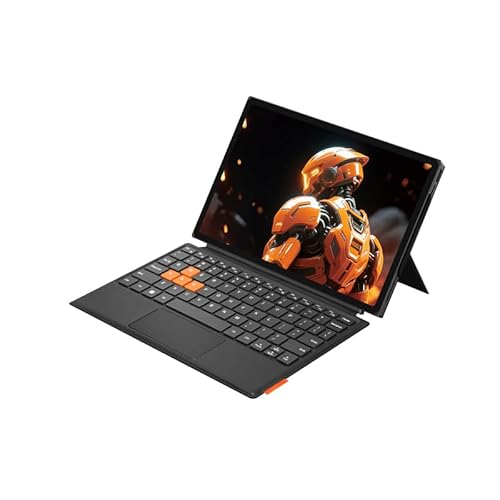
WEELIAO OneXPlayer X1 Air 10.95" Gaming PC
Best for: Large-screen gaming and digital art
- Processor
- Intel Core Ultra 7 258V
- RAM
- 32GB LPDDR5X
- Storage
- 1TB SSD
- Screen Size
- 10.95 inches
- Graphics
- Intel Arc
- Operating System
- Windows 11
View on Amazon: WEELIAO OneXPlayer X1 Air 10.95" Gaming PC Affiliate link
The OneXPlayer X1 Air is a 10.95-inch handheld PC designed for gaming and creative work. It uses an Intel Core Ultra 7 258V processor with Intel Arc graphics and 32GB of LPDDR5X RAM. The device features a 1TB SSD and a 72.77Wh battery. Its 3-in-1 design includes a magnetic keyboard and Hall joysticks. You get a versatile machine for portable play and digital art.
Pros
- Intel Core Ultra 7 258V processor for demanding games
- 32GB LPDDR5X RAM supports smooth multitasking
- 10.95-inch display with ultra-narrow bezels
- Hall joysticks prevent drift during gameplay
- Expandable Mini SSD slot for storage upgrades
Cons
- Heavier build due to laptop mode keyboard
- Smaller battery than some competitors
- Requires Windows 11 knowledge
Good fit if
- You want a large screen for gaming
- You need Hall joysticks for precision
- You create digital art on the go
Skip if
- You prefer a smaller handheld size
- You do not want a magnetic keyboard
- You need longer battery life
Verdict: WEELIAO OneXPlayer X1 Air 10.95" Handheld suits users who value a large display and precise Hall joysticks for gaming or art. It fits those who need a versatile 3-in-1 device with strong Intel Arc graphics.
Specifications side by side
| Spec | WEELIAO OneXPlayer X1 Air 10.95" Gaming PC |
|---|---|
| Processor | Intel Core Ultra 7 258V |
| RAM | 32GB LPDDR5X |
| Storage | 1TB SSD |
| Screen Size | 10.95 inches |
| Graphics | Intel Arc |
| Operating System | Windows 11 |
| Storage Capacity | 1TB |
| Color | Black |
| Memory | 32GB |
| Platform | PC |
| Size | 32GB RAM+1TB SSD |
Frequently asked questions
Is the WEELIAO OneXPlayer X1 Air suitable for digital art?
Yes, this device is well-suited for digital art. It features a large 10.95-inch screen that provides ample workspace for creative tasks. The system includes precise Hall joysticks, which offer accurate control for drawing and design work. You can use it as a tablet or laptop, making it versatile for artists who need portability and precision.
What operating system does the OneXPlayer X1 Air run?
The OneXPlayer X1 Air runs Windows 11. This gives you access to the full desktop ecosystem and standard PC applications. You can install your preferred gaming platforms and creative software without restrictions. The operating system supports multitasking and provides a familiar interface for users transitioning from traditional PCs or laptops.
How much RAM and storage does this handheld have?
This handheld comes with 32GB of RAM and 1TB of storage. The 32GB of memory allows you to run demanding games and multitask smoothly without slowdowns. The 1TB storage capacity gives you plenty of space for your game library, documents, and creative projects. This configuration ensures the device remains responsive during heavy use.
Can I use the OneXPlayer X1 Air as a laptop?
Yes, you can use it as a laptop. The device supports a 3-in-1 form factor that includes a laptop mode. You can attach the included magnetic keyboard to transform the handheld into a traditional computing setup. This flexibility allows you to type comfortably while using the large 10.95-inch screen for work or gaming.
What graphics performance can I expect from this device?
You can expect strong performance from the integrated Intel Arc graphics. These integrated graphics handle modern gaming and creative tasks without needing a separate video card. The system pairs these graphics with an Intel Core Ultra 7 258V processor for balanced performance. This combination ensures smooth gameplay and efficient rendering for your projects.
Is the screen size good for gaming on the go?
The 10.95-inch screen offers a large viewing area for gaming. This size provides better immersion compared to smaller handhelds. You get a clear and expansive display for both gaming and digital art. The large screen makes it easier to see details in complex games and manage multiple windows during creative work.