VITURE Luma Ultra XR Glasses Review: Who It Fits and Who Should Skip It
As an Amazon Associate we earn from qualifying purchases. Links on this page are affiliate links.
This viture luma ultra xr glasses review examines a pair of wearable display glasses designed for handheld gaming and spatial computing. The hardware centers on two key specifications: a 152-inch virtual display running at 1200p resolution and dual Sony Micro-OLED panels delivering up to 1500 nits of brightness. Weighing 2.93 ounces, the glasses connect directly via USB-C to compatible handheld PCs such as the Steam Deck and ROG Ally. You get a 120Hz refresh rate alongside a 52-degree field of view, presenting a high-density personal monitor for gaming and multi-window productivity tasks.
What stands out
- Sony Micro-OLED display delivering 1500 nits brightness and up to 120Hz refresh rate across a 52° field of view.
- Virtual 152-inch screen with 1200p resolution and 35% lower power consumption.
- Front RGB camera and dual depth cameras enabling 6DoF spatial tracking.
- Direct USB-C video output support for Steam Deck, ROG Ally, and Legion Go.
- HARMAN-tuned open-ear audio integrated into a 2.93-ounce frame.
Who it fits
Good fit for
This setup fits you if you game on USB-C handhelds like the Steam Deck, ROG Ally, or Legion Go and want a private 152-inch display. It also suits Mac and Windows users who use SpaceWalker for multi-screen virtual monitors at up to 120Hz. If you own a VITURE Pro Neckband, the dual depth cameras let you use full 6DoF spatial tracking and hand gesture controls for XR interfaces.
Who should skip it
Skip these glasses if you use an iPhone 16e or iPhone 17 Air, as neither model is compatible. You should also look elsewhere if you want 6DoF or hand gestures on mobile devices, because SpaceWalker on iOS and Android does not support them. Console players using a Switch, PS5, or Xbox need an extra dock, and older VITURE HDMI or USB-C charging adapters will not work with this headset.
Verdict: The VITURE Luma Ultra delivers bright, high-refresh Micro-OLED visuals for USB-C handheld gaming PCs and desktop productivity. Advanced tracking requires specific companion hardware, making compatibility checks essential before you buy.
VITURE Luma Ultra Specs Explained
Up to 120Hz refresh rate
A 120Hz refresh rate means the display updates twice as fast as standard 60Hz panels. This produces smoother visual motion when you connect a Steam Deck, ROG Ally, or Legion Go running games at high frame rates. Fast-paced titles benefit from reduced motion jitter. Compare this with 60Hz XR glasses if fluid gameplay is your primary objective.
52° field of view
A 52° field of view defines how much of your vision the projected screen occupies. In practice, this creates a balanced image size that keeps user interface text and minimaps visible without extreme eye movement. Players of portable handhelds who need edge-to-edge clarity benefit most. Compare this against narrower 40° to 45° displays when evaluating visual immersion.
2.93 ounces weight
At 2.93 ounces, these glasses remain lightweight enough for extended handheld sessions. The low mass reduces pressure across the bridge of your nose and ears when you play tethered to a portable PC. Travelers and commute gamers who wear gear for hours gain the biggest advantage. Compare this weight to bulkier headsets that quickly cause physical fatigue.
Front RGB camera and dual depth cameras
This camera configuration tracks physical surroundings to enable spatial awareness and 6DoF movement. In practice, it lets you interact with virtual screens that stay anchored in real-world space when paired with compatible software or hardware. Users seeking productivity workspaces and interactive XR suit this feature. Compare it to fixed display glasses that only offer basic mirrored output.
Frame Hardware and Build Quality
The VITURE Luma Ultra, listed under model V1252, comes in a one-size frame finished in black. According to the listing, the build features a translucent design with subtle light effects. The glasses weigh 2.93 ounces. This sub-three-ounce build keeps downward pressure minimal on the bridge of your nose and ears, making the glasses practical to pack into travel bags and wear during extended gaming sessions.
The physical layout places an RGB camera alongside dual depth cameras directly on the front frame. These sensors provide the hardware foundation for environmental tracking and spatial awareness. For integrated audio, the frame features HARMAN-tuned open-ear speakers. This layout lets you hear game audio and media without placing buds inside your ears, allowing ambient background sound in while you use the glasses at home.
Chassis control options rely on your connected devices. According to the listing, operating full six-degree-of-freedom tracking and hand gesture controls requires pairing the glasses with a VITURE Pro Neckband. The physical design does not include dedicated gesture control hardware on the frame itself. Instead, the onboard front sensors capture spatial depth data while external accessories handle gesture inputs.
Connecting Devices and Everyday XR Use
Connecting supported handhelds like the Steam Deck, ROG Ally, or Legion Go requires a direct USB-C video-out cable. Compatible iPhone 15, 16, and 17 devices also link directly, though iPhone 16e and iPhone 17 Air are unsupported. For consoles like Nintendo Switch, Switch 2, PS5, or Xbox, setup requires an adapter such as the VITURE Pro Mobile Dock. Older VITURE adapters do not work with this unit.
For daily software use, the SpaceWalker app enables side-by-side workspaces, ultra-wide viewing, and 2D-to-3D conversion. On Windows and Mac, SpaceWalker supports 6DoF spatial tracking via the front RGB camera and dual depth cameras. On iOS, unlocking 3DoF tracking and multi-screen modes requires the USB-C XR Charging Adapter Ultra. Achieving full 6DoF movement and hand gesture navigation requires pairing the hardware with the VITURE Pro Neckband, as mobile SpaceWalker on iOS and Android does not support these features.
Everyday audio relies on built-in HARMAN-tuned open-ear speakers, keeping you aware of your environment while gaming in bed or traveling. For console streaming, the hardware supports remote play tools including PXPlay and XBXPlay. In shared or noisy spaces, pairing separate earbuds is recommended.
Hardware Requirements and Compatibility Before Buying
Adding the VITURE Luma Ultra to your handheld gaming PC setup requires checking external hardware requirements. If you play on a Steam Deck, ROG Ally, or Legion Go, verify that your device supports USB-C video output. You may need extra gear depending on your platform. Full 6DoF tracking and hand gesture controls require the VITURE Pro Neckband. For iOS devices, full SpaceWalker features demand the upcoming USB-C XR Charging Adapter Ultra, and older VITURE adapters will not work. Note that the iPhone 16e and iPhone 17 Air do not support the glasses. Keep the front RGB camera and dual depth sensors clean to maintain spatial awareness. In public spaces, you may want separate earbuds, as the built-in HARMAN open-ear audio leaves sound audible nearby. Unlike portable desktop screens, this hardware functions as wearable virtual screen gear.
Check before you buy
- Ensure your handheld PC or phone supports direct USB-C video output.
- Confirm you do not rely on an incompatible iPhone 16e or iPhone 17 Air.
- Acquire the VITURE Pro Neckband if you want 6DoF tracking and hand gestures.
- Verify you are not using older unsupported VITURE charging or HDMI adapters.
The product at a glance
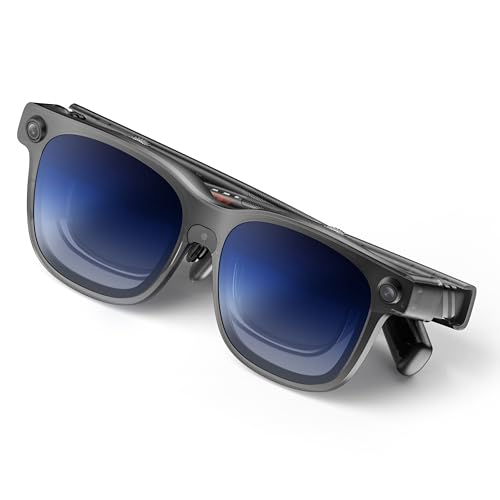
VITURE Luma Ultra 152-Inch 1200p AR Glasses
Best for: handheld PC gaming and portable multi-screen workspaces
- Virtual Screen Size
- 152"
- Display Resolution
- 1200p
- Refresh Rate
- Up to 120Hz
- Brightness
- 1500 nits
- Field of View
- 52°
- Tracking Degrees
- 6DoF, 3DoF
View on Amazon: VITURE Luma Ultra 152-Inch 1200p AR Glasses Affiliate link
The VITURE Luma Ultra is a pair of wearable XR glasses weighing 2.93 ounces. You get Sony Micro-OLED displays offering 1200p resolution, up to 120Hz refresh rates, and 1500 nits of brightness across a 52-degree field of view. It suits you if you play on USB-C handhelds like the Steam Deck or want multi-screen workspaces.
Pros
- Sony Micro-OLED panels with 1200p resolution and up to 120Hz refresh rate
- 1500 nits peak brightness and a 52-degree field of view
- Direct USB-C display support for Steam Deck, ROG Ally, and Legion Go
- Front RGB camera and dual depth cameras for spatial tracking
Cons
- Full 6DoF tracking and gesture controls require the separate VITURE Pro Neckband
- Consoles like Nintendo Switch and PS5 require an optional dock adapter
- Incompatible with iPhone 16e and iPhone 17 Air
Good fit if
- You play games on USB-C handhelds such as the Steam Deck, ROG Ally, or Legion Go.
- You want a 120Hz, 1500-nit virtual screen for gaming or PC productivity.
- You plan to use the VITURE Pro Neckband for 6DoF spatial tracking.
Skip if
- You use an incompatible phone such as the iPhone 16e or iPhone 17 Air.
- You want standalone 6DoF tracking on iOS or Android devices without extra hardware.
- You primarily play on HDMI home consoles and want to avoid external docks.
Verdict: VITURE Luma Ultra 1200p XR Glasses delivers high-brightness 120Hz visuals directly to USB-C handheld gamers and desktop multitaskers. It fits users who want wearable Micro-OLED displays and are willing to connect dedicated adapters for console play and full 6DoF tracking.
Specifications side by side
| Spec | VITURE Luma Ultra 152-Inch 1200p AR Glasses |
|---|---|
| Virtual Screen Size | 152" |
| Display Resolution | 1200p |
| Refresh Rate | Up to 120Hz |
| Brightness | 1500 nits |
| Field of View | 52° |
| Tracking Degrees | 6DoF, 3DoF |
| Panel Type | Sony Micro-OLED |
| Color | Black |
| Platform | PC, Mobile, Nintendo Switch, PS5, Mac, macOS |
| Weight | 2.93 ounces |
| Size | One Size |
| Model | V1252 |
Frequently asked questions
Who should buy the VITURE Luma Ultra glasses?
The VITURE Luma Ultra fits players focused on handheld PC gaming and professionals building portable multi-screen workspaces. You get wearable Micro-OLED panels running at high brightness. The glasses suit you if you prioritize portable external monitors and do not mind using dedicated adapters for gaming consoles or advanced tracking features.
What screen size and resolution does the VITURE Luma Ultra project?
The VITURE Luma Ultra projects a 152-inch virtual display running at 1200p resolution. This setup uses dual Micro-OLED panels to deliver sharp visuals directly in front of your eyes. The screen output works for handheld gaming systems or desktop multitasking setups that support direct video output over a compatible cable connection.
How heavy is the VITURE Luma Ultra model V1252 frame?
The VITURE Luma Ultra model V1252 weighs exactly 2.93 ounces. It comes in a one-size black frame designed for wearable daily use. This low total weight keeps facial pressure minimal when you wear the glasses during longer handheld PC gaming sessions or while working across multiple virtual desktop screens on the go.
What refresh rate does the VITURE Luma Ultra display provide?
The VITURE Luma Ultra provides refresh rates up to 120Hz. A 120Hz display refreshes images faster than baseline 60Hz panels to maintain smooth motion. You benefit from this faster refresh rate when connecting handheld gaming PCs or laptops that can push high frame rates through a supported USB-C video connection.
Do you need adapters to use the VITURE Luma Ultra with consoles?
You need dedicated adapters to run the VITURE Luma Ultra with traditional gaming consoles. While standard USB-C video devices connect directly, console hardware requires specific adapter units to transmit video signals to the glasses. You should plan for these extra accessories if your primary goal is playing home console systems.
How do you enable 6DoF tracking on the VITURE Luma Ultra?
Enabling full 6DoF tracking on the VITURE Luma Ultra requires connecting dedicated adapters. Six degrees of freedom tracking allows the glasses to track physical movement through three-dimensional space. If you want full spatial computing rather than standard fixed virtual display mirroring, you must incorporate the necessary external adapter hardware into your configuration.