Operating System Explained: What It Means for Handheld Gaming PCs
As an Amazon Associate we earn from qualifying purchases. Links on this page are affiliate links.
Operating System Explained for You
The operating system is the core software layer that lets your handheld hardware function. It manages resources, runs games, and connects you to digital stores. When you look at specs, you will see several distinct options. Each one changes how you use the device.
Windows 11 is the most common choice. It gives you full access to the PC ecosystem. You can install any game from Steam, Epic, or GOG. It also supports desktop applications and standard drivers. This option is ideal if you want a traditional computer experience in a portable form. You are not limited to a curated store.
Android offers a different approach. It is designed for touch controls and mobile games. The interface is simpler and often more battery-efficient. However, you cannot run standard Windows PC games. This system is best for casual gaming or emulating older console titles. It lacks the breadth of desktop software.
SteamOS is a Linux-based system built by Valve. It is optimized for Steam Deck hardware but can be found on other devices. It uses Proton to run Windows games seamlessly. The interface focuses on console-like usability. You get a streamlined gaming library without the clutter of a full desktop. It is a middle ground between Android and Windows.
Windows 11 Pro adds business features to the standard OS. You get BitLocker encryption and remote desktop capabilities. These features matter for users who treat their handheld as a primary work tool. The gaming performance remains similar to the standard version.
Understanding the operating system explained helps you pick the right device. Your choice depends on whether you prioritize game variety, ease of use, or specific features. Check the listing carefully. The OS dictates what you can actually play and do on the go.
Choose Your Handheld Operating System
Windows 11
Windows 11 gives you full desktop compatibility on a portable device. You can install any Windows application, including professional creative tools and legacy games. This option suits users who need a true PC experience while traveling. The Tylvx Mini PC with 16GB RAM and a 5.7-inch touchscreen demonstrates this balance. It offers robust connectivity and productivity features in a compact form. However, you must manage drivers and updates yourself. Battery life often suffers compared to mobile-focused systems. You also handle security and maintenance without automated oversight. This path requires more technical knowledge but offers maximum flexibility for work and play.
Android
Android provides a mobile-first experience optimized for touch and portability. You get access to the Google Play Store and a vast library of mobile games. This system suits users who prioritize ease of use and long battery life. The AYN Odin 2 Max with 16GB RAM and 512GB storage shows how powerful Android can be for gaming. It delivers flagship performance in a 6-inch package. The trade-off is limited desktop software compatibility. You cannot run full Windows applications natively. Some games may require emulators or workarounds. This option is ideal if you mainly want to play games and consume media without worrying about system maintenance or complex configurations.
SteamOS
SteamOS is a Linux-based system designed specifically for Steam gaming. It offers a console-like interface that simplifies game launching and management. This option suits gamers who want a plug-and-play experience with minimal setup. The Lenovo Legion Go S with an 8-inch 120Hz display and 32GB RAM highlights its strength in high-performance gaming. It supports a wide range of titles through Steam Proton compatibility. You get a streamlined gaming hub without desktop clutter. The downside is limited non-gaming software support. Productivity apps are not natively available. You are mostly confined to the Steam ecosystem. This path is best if your primary goal is gaming with a familiar, easy-to-use interface.
Windows 11 Pro
Windows 11 Pro adds enterprise features to the standard Windows 11 experience. You get enhanced security, remote desktop capabilities, and domain joining options. This option suits professionals who need advanced management tools on the go. The ONERugged 6.5-inch model with 8GB RAM and 128GB storage illustrates its durability and utility. It is built for field computing and harsh environments. You retain full desktop compatibility while gaining extra administrative controls. The trade-off is higher complexity and potentially higher cost. You may not need these features for casual use. Battery life remains a concern similar to standard Windows. This path is ideal if you require secure, managed access to corporate resources or advanced system control.
Who Needs This OS Choice
Who needs it
You should prioritize this specification if you require maximum flexibility in your gaming and productivity workflow. Windows 11 and Windows 11 Pro offer full desktop compatibility, allowing you to install any Windows application. This includes professional creative tools and legacy games that other systems cannot run. If you need a true PC experience while traveling, these options suit your needs perfectly. They manage resources efficiently and connect you to extensive digital stores. For users who rely on specific software that only runs on Windows, this choice is essential. It ensures your handheld device functions as a complete computer rather than a limited gaming console. The ability to run diverse applications makes these operating systems ideal for power users who demand versatility and broad software support in a portable form factor.
Who can skip it
You can ignore this detail if you prefer a simplified, dedicated gaming environment. Android and SteamOS provide streamlined experiences focused primarily on gaming. These systems often require less maintenance and offer a more intuitive interface for casual players. If you do not need to run professional creative tools or legacy Windows applications, these alternatives may serve you better. They prioritize ease of use and immediate playability over broad software compatibility. Users who value a distraction-free gaming experience will find these options more suitable. They eliminate the complexity of managing a full desktop operating system. Instead, you can focus on your games without worrying about background processes or software conflicts. For those who want a device that works out of the box for gaming, skipping the Windows options is a practical choice.
Glossary of Terms
Operating System
The core software that manages hardware resources and runs applications. It serves as the bridge between your physical device and the games you play.
Processor
The central component that executes instructions. A faster processor handles complex game logic and physics calculations more efficiently, reducing stuttering during intense scenes.
RAM
Temporary memory used for active tasks. More RAM allows the system to keep more game data ready, improving multitasking and loading speeds significantly.
Storage Capacity
The total space available for files and games. Larger capacity lets you install more titles without needing to constantly delete older content to make room.
Screen Size
The diagonal measurement of the display. Common sizes range from seven to nine inches, balancing portability with visual clarity for different play styles.
Refresh Rate
How many times the screen updates per second. A higher rate, such as sixty hertz or more, creates smoother motion and reduces visual tearing.
Display Type
The technology used to create the image. Options like IPS or OLED affect color accuracy, contrast ratios, and viewing angles for your gaming experience.
Screen Resolution
The number of pixels displayed horizontally and vertically. Higher resolution means sharper images, though it demands more processing power to maintain smooth frame rates.
Quick picks
| # | Product | Best for | Price |
|---|---|---|---|
| 1 | Tylvx Mini PC 5.7" Handheld Computer | portable Windows 11 productivity and connectivity | Check price of Tylvx Mini PC 5.7" Handheld Computer on Amazon |
| 2 | AYANEO Pocket S 6-Inch Android Handheld | compact Android gaming with strong cooling | Check price of AYANEO Pocket S 6-Inch Android Handheld on Amazon |
| 3 | Lenovo Legion Go S 8" 120Hz | Large-screen portable gaming with high RAM | Check price of Lenovo Legion Go S 8" 120Hz on Amazon |
| 4 | ONERugged 6.5-inch Windows Rugged Handheld PC | Rugged portable Windows 11 Pro field computing | Check price of ONERugged 6.5-inch Windows Rugged Handheld PC on Amazon |
| 5 | ONEXPLAYER 3 8.8" 3-in-1 Handheld | Users needing large AMOLED display and versatile modes | Check price of ONEXPLAYER 3 8.8" 3-in-1 Handheld on Amazon |
| 6 | AYN Odin 2 Max 6-inch Android Handheld | High-performance Android gaming on the go | Check price of AYN Odin 2 Max 6-inch Android Handheld on Amazon |
Our 6 picks

Tylvx Mini PC 5.7" Handheld Computer
Best for: portable Windows 11 productivity and connectivity
- Operating System
- Windows 11 (what this guide is about)
- Processor
- N95 up to 3.4GHz
- RAM
- 16GB DDR4
- Storage
- 512GB SSD
- Screen Size
- 5.7"
- Display Type
- HD touchscreen
View on Amazon: Tylvx Mini PC 5.7" Handheld Computer Affiliate link
This handheld computer pairs an Intel N95 processor with 16GB of RAM and a 512GB SSD. It features a 5.7-inch HD touchscreen and runs Windows 11. The design includes a backlit keyboard and dual 4K@60Hz display outputs. It suits users who need portable productivity tools with full desktop connectivity.
Pros
- 16GB DDR4 RAM for smooth multitasking
- 512GB SSD for fast storage access
- HDMI 2.1 and DisplayPort 1.2 support 4K@60Hz output
- Pre-installed Windows 11 operating system
Cons
- Small 16.34Wh battery limits untethered use
- 1MP front camera is low resolution
- 7-inch listed screen size conflicts with 5.7-inch title
Good fit if
- You need a portable Windows 11 device for coding
- You want to connect dual external monitors
- You require a compact unit for remote server management
Skip if
- You need high-end gaming performance
- You require a high-resolution front camera
- You prefer a larger display for media consumption
Verdict: Tylvx 5.7" N95 Handheld PC is a compact workstation for users who need portable Windows 11 productivity with external monitor support.

AYANEO Pocket S 6-Inch Android Handheld
Best for: compact Android gaming with strong cooling
- Operating System
- Android (what this guide is about)
- Processor
- Snapdragon G3x Gen 2
- RAM
- 16GB
- Storage
- 512GB
- Screen Size
- 6"
- Resolution
- 1920x1080
View on Amazon: AYANEO Pocket S 6-Inch Android Handheld Affiliate link
The AYN Pocket S is a 6-inch Android handheld powered by the Snapdragon G3x Gen 2. It features 16GB of RAM and 512GB of storage. The device uses a borderless 1080p screen with 400 nits brightness. It includes active air cooling and a 6000mAh battery. This setup suits you if you want a compact, high-performance Android gaming device with strong thermal management.
Pros
- Snapdragon G3x Gen 2 processor
- 16GB RAM and 512GB storage
- 6-inch 1080p borderless display
- Active air cooling system
Cons
- 400 nits brightness may struggle in direct sunlight
- 390g weight feels substantial in one hand
- No mention of wireless controller support
Good fit if
- You prioritize screen-to-body ratio
- You want 16GB RAM for multitasking
- You prefer active cooling for sustained play
Skip if
- You need a brighter screen for outdoor use
- You prefer a lighter device under 350g
- You require native Windows PC gaming
Verdict: AYANEO Pocket S Android 6-Inch delivers strong specs in a compact form. It fits you if you want a dedicated Android handheld with robust cooling and ample memory.
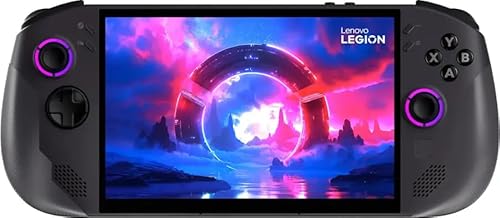
Lenovo Legion Go S 8" 120Hz
Best for: Large-screen portable gaming with high RAM
- Operating System
- SteamOS (what this guide is about)
- Processor
- AMD Ryzen Z1 Extreme
- RAM
- 32GB
- Storage
- 1TB SSD
- Screen Size
- 8"
- Refresh Rate
- 120Hz
View on Amazon: Lenovo Legion Go S 8" 120Hz Affiliate link
The Lenovo Legion Go S features an AMD Ryzen Z1 Extreme processor paired with 32GB of RAM. It includes a 1TB SSD and an 8-inch WUXGA display with a 120Hz refresh rate. The device runs SteamOS and uses AMD Radeon graphics. This setup supports smooth gameplay for portable gaming. You get a high-resolution screen and ample storage for your library.
Pros
- AMD Ryzen Z1 Extreme processor for strong performance
- 32GB RAM for multitasking and heavy games
- 1TB SSD provides ample game storage
- 8-inch WUXGA display with 120Hz refresh rate
Cons
- 1920x1200 resolution is lower than 4K alternatives
- SteamOS may limit compatibility with non-Steam titles
- No mention of advanced thermal management features
Good fit if
- You want high RAM for smooth multitasking
- You prefer a large 8-inch screen
- You need a 1TB storage capacity
Skip if
- You require 4K resolution for maximum clarity
- You need Windows for specific non-Steam software
- You prefer a smaller, more portable form factor
Verdict: Lenovo Legion Go S 8-Inch Handheld is ideal for gamers who prioritize screen size and memory capacity. It suits those who want a large display and fast storage for their portable gaming setup.

ONERugged 6.5-inch Windows Rugged Handheld PC
Best for: Rugged portable Windows 11 Pro field computing
- Operating System
- Windows 11 Pro (what this guide is about)
- Processor
- Intel N5100
- RAM
- 8GB
- Storage
- 128GB
- Screen Size
- 6.5 inch
- Resolution
- 720x1600
View on Amazon: ONERugged 6.5-inch Windows Rugged Handheld PC Affiliate link
This handheld runs Windows 11 Pro on an Intel Jasper Lake N5100 processor with 8GB of RAM and 128GB of internal storage. It features a 6.5-inch 720x1600 screen and an IP65 rugged build. It suits you if you need a durable Windows device for productivity, data capture, and lightweight portable computing.
Pros
- Pre-installed Windows 11 Pro operating system
- IP65 and MIL-STD-810H certified drop-resistant construction
- Detachable 4000mAh battery with 45W fast charging
- Integrated Honeywell N4680 1D and 2D barcode scanner
Cons
- Jasper Lake N5100 processor offers modest computing power
- Internal storage capacity is limited to 128GB
- Lacks integrated physical gamepad buttons and analog sticks
Good fit if
- You need the Windows 11 Pro operating system on a pocket-sized machine.
- You work in harsh environments requiring water, dust, and drop resistance.
- You want a removable battery system for continuous operation.
Skip if
- You want built-in gaming controls such as joysticks and triggers.
- You plan to play modern graphical games requiring high-end processing hardware.
Verdict: ONERugged 6.5-Inch Windows 11 Pro Handheld fits buyers who need full Windows desktop software and extreme physical durability in a pocketable form factor.

ONEXPLAYER 3 8.8" 3-in-1 Handheld
Best for: Users needing large AMOLED display and versatile modes
- Operating System
- Windows 11 (what this guide is about)
- Processor
- Arc G3 Extreme
- RAM
- 32GB LPDDR5X
- Storage
- 1TB SSD
- Screen Size
- 8.8"
- Refresh Rate
- 144Hz
View on Amazon: ONEXPLAYER 3 8.8" 3-in-1 Handheld Affiliate link
The ONEXPlayer 3 is an 8.8-inch Windows 11 handheld featuring an Arc G3 Extreme processor and 32GB of LPDDR5X RAM. It includes a 1TB SSD and an 85Wh battery. The device supports three modes via detachable controllers. It offers a 144Hz AMOLED display with HDR. This machine suits users needing desktop-class power in a portable form factor for gaming and productivity tasks.
Pros
- Arc G3 Extreme processor delivers desktop-class performance
- 8.8-inch 144Hz AMOLED display with HDR support
- 32GB LPDDR5X RAM for smooth multitasking
- Detachable controllers enable handheld, tablet, and laptop modes
Cons
- Heavy gaming limits battery life to 2–3 hours
- 8.8-inch screen is bulky for one-handed use
- Windows 11 requires more maintenance than SteamOS
Good fit if
- You want a large, high-refresh-rate AMOLED screen
- You need detachable controllers for versatile usage modes
- You require 32GB of RAM for demanding tasks
Skip if
- You prefer a compact device for one-handed play
- You want a plug-and-play Linux-based gaming OS
- You need all-day battery life for heavy gaming
Verdict: ONEXPlayer 3 8.8" Windows 11 Handheld fits users who prioritize a large, vibrant display and desktop-level performance in a convertible form factor.

AYN Odin 2 Max 6-inch Android Handheld
Best for: High-performance Android gaming on the go
- Operating System
- Android (what this guide is about)
- Processor
- Snapdragon 8 Gen 2
- RAM
- 16GB LPDDR5X
- Storage
- 512GB UFS 4.0
- Screen Size
- 6"
- Resolution
- 1920x1080
View on Amazon: AYN Odin 2 Max 6-inch Android Handheld Affiliate link
The AYN Odin 2 Max is a 6-inch Android handheld built for high-performance mobile gaming. It features the Snapdragon 8 Gen 2 processor and 16GB of LPDDR5X RAM. The Adreno 740 GPU drives a 1080p display with vibrant colors. You get 512GB of fast UFS 4.0 storage and an 8000mAh battery for long sessions. Wi-Fi 7 and Bluetooth 5.3 ensure reliable connectivity. This device suits players who want top-tier specs in a portable form factor.
Pros
- Snapdragon 8 Gen 2 octa-core CPU for fast processing
- 16GB LPDDR5X RAM and 512GB UFS 4.0 storage
- 6-inch 1920x1080 touchscreen with Adreno 740 GPU
- 8000mAh Li-Pro battery for extended playtime
- Wi-Fi 7 and Bluetooth 5.3 connectivity
Cons
- 14.8-ounce weight may cause fatigue during long sessions
- Runs Android 13, which may lack latest OS features
- 1080p resolution is modest for a 6-inch screen
Good fit if
- You prioritize raw processing power and high RAM
- You need large internal storage for a big library
- You want modern Wi-Fi 7 for online gaming
Skip if
- You prefer a lighter device under 12 ounces
- You require the latest Android operating system version
- You want a 4K display for maximum clarity
Verdict: AYN Odin 2 Max 6-Inch Android Handheld delivers flagship-level performance for serious mobile gamers. It fits those who value speed and storage over compact weight or cutting-edge OS versions.
Specifications side by side
| Spec | Tylvx Mini PC 5.7" Handheld Computer | AYANEO Pocket S 6-Inch Android Handheld | Lenovo Legion Go S 8" 120Hz | ONERugged 6.5-inch Windows Rugged Handheld PC | ONEXPLAYER 3 8.8" 3-in-1 Handheld | AYN Odin 2 Max 6-inch Android Handheld |
|---|---|---|---|---|---|---|
| Processor | N95 up to 3.4GHz | Snapdragon G3x Gen 2 | AMD Ryzen Z1 Extreme | Intel N5100 | Arc G3 Extreme | Snapdragon 8 Gen 2 |
| RAM | 16GB DDR4 | 16GB | 32GB | 8GB | 32GB LPDDR5X | 16GB LPDDR5X |
| Storage | 512GB SSD | 512GB | 1TB SSD | 128GB | 1TB SSD | 512GB UFS 4.0 |
| Screen Size | 5.7" | 6" | 8" | 6.5 inch | 8.8" | 6" |
| Refresh Rate | not stated | not stated | 120Hz | not stated | 144Hz | not stated |
| Display Type | HD touchscreen | not stated | not stated | not stated | AMOLED | not stated |
| Resolution | not stated | 1920x1080 | 1920x1200 | 720x1600 | 1920x1200 | 1920x1080 |
| Graphics | not stated | not stated | AMD Radeon 780M | not stated | not stated | Adreno 740 |
| Operating System | Win 11 | Android | SteamOS | Windows 11 Pro | Win11 | Android 13 |
| Storage Capacity | 512GB | 512GB | 1TB | 128GB | 1TB | 512GB |
| Screen Resolution | not stated | 1080p | 1920 x 1200 | not stated | not stated | 1080p |
| Color | Black | White | Nebula Nocturne | Black | not stated | Odin 2 Max - Cold Grey |
| Graphics Card | not stated | not stated | AMD Radeon | not stated | not stated | not stated |
| Memory | 16GB | 16GB | 32GB | 8GB | 32GB | 16GB |
| Platform | PC | Mobile | not stated | PC | PC | Mobile |
| Dimensions | not stated | not stated | not stated | 0.94 × 7.21 × 3.49 inches | not stated | 8.86 × 3.86 × 0.67 inches |
| Weight | not stated | not stated | not stated | 11 ounces | not stated | 14.8 ounces |
| Model | UB02-16+512 | b745d714-d3e1-4c37-828c-6afd3f79a426 | 8APU1 | I61J | onexplayer 3 | AYN Odin 2 |
| Size | not stated | 16GB+512GB | not stated | not stated | not stated | 16GB LPDDR5X / 512GB UFS 4.0 |
If you evaluate acoustic percussion instruments as well, snare system explained details internal wire designs for cajon buyers.
Frequently asked questions
Can I run Windows programs on an Android handheld?
No, you cannot run native Windows applications on Android devices. Android handhelds like the AYANEO Pocket S and AYN Odin 2 Max use a mobile operating system designed for touch interfaces and mobile apps. You are limited to Android-compatible games and emulators. If you need full desktop software compatibility, you must choose a device running Windows 11 or Windows 11 Pro.
Is SteamOS better than Windows 11 for gaming?
SteamOS offers a streamlined, console-like interface optimized for gaming, as seen on the Lenovo Legion Go S. It simplifies launching games and managing your library without desktop clutter. Windows 11 provides broader compatibility, allowing you to install non-Steam clients and professional tools. Choose SteamOS for a focused gaming experience, or Windows 11 for maximum flexibility and desktop utility.
What is the difference between Windows 11 and Windows 11 Pro?
Windows 11 Pro adds advanced management and security features over the standard version. The ONERugged 6.5-inch model uses Windows 11 Pro for field computing needs, offering enhanced durability and enterprise-grade capabilities. For most gamers, standard Windows 11 is sufficient for gaming and productivity. You only need Pro if you require specific business tools, remote desktop features, or advanced system administration options.
Which operating system supports the largest screen sizes?
Windows 11 devices typically support larger displays, such as the 8.8-inch screen on the ONEXPlayer 3 or the 8-inch panel on the Lenovo Legion Go S. These systems handle high-resolution outputs and external monitor connections well. Android handhelds usually feature smaller screens, like the 6-inch displays on the AYANEO Pocket S and AYN Odin 2 Max, prioritizing compact portability over screen real estate.
Does the operating system affect RAM requirements?
Yes, the operating system influences how much RAM you need for smooth performance. Windows 11 and Windows 11 Pro devices often include 16GB to 32GB of RAM to handle complex desktop tasks and heavy games. Android handhelds, like those with 16GB of memory, are optimized for mobile efficiency. You should match your RAM to your OS and intended use, ensuring enough headroom for multitasking and large game files.
Can I use an Android handheld for work tasks?
Android handhelds are primarily designed for mobile gaming and entertainment, not professional work. Devices like the AYN Odin 2 Max focus on speed and storage for games rather than desktop productivity. If you need to run professional creative tools or legacy software, choose a Windows 11 or Windows 11 Pro device. These operating systems provide the full desktop environment necessary for serious work applications while on the go.