ONEXPLAYER F1 Pro or ONEXPLAYER OneXfly F1 Pro Handheld? Which ONEXPLAYER Model to Buy
As an Amazon Associate we earn from qualifying purchases. Links on this page are affiliate links.
You are comparing the onexplayer f1 pro vs onexfly f1 pro handheld to find the right Windows 11 device. Both units share a 7-inch OLED display, the Ryzen AI 9 HX 370 processor, and 2TB of storage. The main difference lies in memory capacity and feature sets. The F1 Pro offers 64GB of RAM and advanced controls like Hall-effect joysticks. The OneXfly F1 Pro provides 32GB of RAM and includes a linear vibration motor. Your choice depends on whether you need maximum multitasking power or standard gaming features.
Key differences
| Aspect | ONEXPLAYER F1 Pro 7" OLED 144Hz | ONEXPLAYER OneXfly F1 Pro 7" OLED |
|---|---|---|
| RAM | 64GB LPDDR5x 7500MHz | 32GB |
| Joystick Type | Asymmetric Hall joysticks | Standard joysticks with RGB light |
| Vibration | Not listed | Linear vibration motor |
| Audio | Harman AudioEFX dual speakers | Harman Certified Sound Effect |
| Processor | Ryzen AI 9 HX 370 | AMD Ryzen AI 9 HX 370 |
Which one should you choose?
Choose ONEXPLAYER F1 Pro 7" OLED 144Hz if
- You need 64GB of RAM for heavy multitasking or AI workloads
- You want Hall-effect joysticks to prevent stick drift over time
- You prefer a device marketed as a portable Windows workstation with USB4 ports
Choose ONEXPLAYER OneXfly F1 Pro 7" OLED if
- You want haptic feedback via a linear vibration motor
- You prefer a simpler configuration with 32GB of RAM
- You are satisfied with standard joysticks featuring RGB lighting
Verdict: Choose the F1 Pro if you require double the RAM for professional tasks or want the longevity of Hall-effect controls. Pick the OneXfly F1 Pro if you value haptic vibration feedback and a standard gaming layout. Both devices deliver identical core performance and display quality.
F1 Pro vs OneXfly F1 Pro
Memory capacity
The ONEXPLAYER F1 Pro includes 64GB of LPDDR5x RAM running at 7500MHz, while the OneXfly F1 Pro has 32GB of RAM. Both devices use the same Ryzen AI 9 HX 370 processor, which benefits significantly from high memory bandwidth. The 64GB configuration in the F1 Pro allows for heavier multitasking and better performance when running large AI models or demanding Windows applications. This doubled memory capacity provides a clear advantage for users who plan to keep many programs open or rely on on-device AI features. The OneXfly F1 Pro offers sufficient memory for standard gaming, but the F1 Pro is better suited for intensive workloads.
Display specifications
Both handhelds feature a 7-inch OLED display with a 1920x1080 resolution. The ONEXPLAYER F1 Pro explicitly lists a 144Hz refresh rate, 0.6ms response time, 760 nits peak brightness, and 112% DCI-P3 color gamut. It also supports 10-point touch input. The OneXfly F1 Pro data confirms the OLED type and resolution but does not provide specific details on refresh rate, brightness, or color coverage. The documented high refresh rate and color accuracy in the F1 Pro suggest a smoother and more vibrant visual experience, especially for fast-paced games and media consumption. You should verify the OneXfly specs if these metrics are critical to your purchase.
Power management
The ONEXPLAYER F1 Pro supports 65W GaN charging and includes a 48.5Wh battery with a liquid-bearing fan and pure copper heatsink. This setup allows for sustained 65W performance, which is higher than typical 7-inch handhelds. The OneXfly F1 Pro data does not list battery capacity, charging wattage, or cooling system details. The documented power infrastructure in the F1 Pro indicates better thermal management and longer sustained performance under load. This makes the F1 Pro more suitable for extended gaming sessions or desktop replacement use where consistent power delivery is necessary. The lack of data for the OneXfly leaves its power capabilities unclear.
Connectivity options
The ONEXPLAYER F1 Pro provides two USB4 ports, a USB-A 3.0 port, microSD 4.0 support, Wi-Fi 6E, and Bluetooth 5.2. The OneXfly F1 Pro data does not specify its port selection or wireless standards. USB4 connectivity in the F1 Pro allows for high-speed data transfer and external display output, enhancing its utility as a portable workstation. Wi-Fi 6E offers improved network performance in congested areas. The comprehensive port list in the F1 Pro suggests greater versatility for connecting peripherals and docks. You may need to check the OneXfly manual for its specific connectivity features.
Controls and feedback
The ONEXPLAYER F1 Pro features asymmetric Hall-effect joysticks, linear Hall-effect triggers, a 3-axis gyro, and macro buttons. It also includes Harman AudioEFX dual speakers. The OneXfly F1 Pro mentions Harman-certified sound effects, a linear vibration motor, and RGB joystick light circles. The Hall-effect controls in the F1 Pro prevent stick drift over time, offering greater durability. The OneXfly F1 Pro emphasizes haptic feedback and visual effects with its vibration motor and RGB lighting. Both devices prioritize audio quality, but the F1 Pro offers more precise input mechanisms for competitive gaming, while the OneXfly focuses on immersive sensory feedback.
Which ONEXPLAYER F1 Model Suits You
Users needing maximum multitasking and AI performance
The F1 Pro offers 64GB of LPDDR5x RAM at 7500MHz. This doubled memory capacity allows you to run heavy Windows applications, large AI models, and multiple games simultaneously without slowdowns. The higher bandwidth ensures smoother performance for demanding desktop-class tasks compared to the 32GB option.
Players prioritizing tactile feedback and precise controls
This model features asymmetric Hall-effect joysticks and linear Hall triggers. These components eliminate stick drift caused by physical contact wear over time. You get consistent precision for competitive gaming. The device also includes a 3-axis gyro and macro buttons for enhanced control flexibility during extended play sessions.
Gamers seeking immersive haptic and visual effects
The OneXfly F1 Pro includes a linear vibration motor for faster response and richer haptic feedback. It also features RGB joystick light circles to enhance the esports atmosphere. These design elements create a more immersive sensory experience while playing games, complementing the 7-inch OLED display for visual engagement.
The products compared
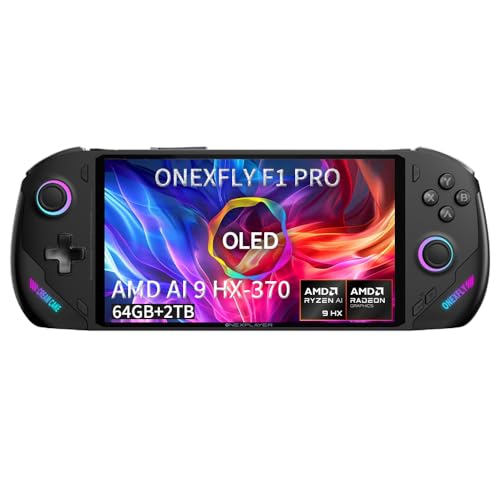
ONEXPLAYER F1 Pro 7" OLED 144Hz
Best for: power users needing high RAM and OLED
- Processor
- Ryzen AI 9 HX 370
- RAM
- 64GB LPDDR5x 7500MHz
- Storage
- 2TB M.2 2280 PCIe 4.0
- Screen Size
- 7"
- Refresh Rate
- 144Hz
- Display Type
- OLED
View on Amazon: ONEXPLAYER F1 Pro 7" OLED 144Hz Affiliate link
The ONEXPLAYER F1 Pro pairs a Ryzen AI 9 HX 370 processor with 64GB of LPDDR5x RAM and a 2TB SSD. Its 7-inch OLED display offers 144Hz refresh and 760 nits brightness. You get USB4 connectivity and Hall-effect controls in a 599g chassis. This setup runs full Windows 11, making it a portable workstation for demanding games and AI tasks.
Pros
- Ryzen AI 9 HX 370 with 64GB RAM
- 7-inch 144Hz OLED display with 760 nits
- 2TB PCIe 4.0 SSD storage
- Hall-effect joysticks and triggers
Cons
- 48.5Wh battery limits unplugged play
- 599g weight adds to fatigue
- Windows 11 requires manual management
Good fit if
- You need desktop-class performance in a handheld
- You want a high-brightness OLED screen
- You require large local storage for games
Skip if
- You prefer lighter devices under 500g
- You want a dedicated console OS
- You need all-day battery life
Verdict: ONEXPLAYER F1 Pro Ryzen AI 9 delivers serious power for users who prioritize screen quality and memory capacity over portability weight. It suits those who treat the device as a primary PC replacement.

ONEXPLAYER OneXfly F1 Pro 7" OLED
Best for: OLED display enthusiasts needing 32GB RAM
- Processor
- AMD Ryzen AI 9 HX 370
- RAM
- 32GB
- Storage
- 2TB SSD
- Screen Size
- 7"
- Display Type
- OLED
- Operating System
- Win 11
View on Amazon: ONEXPLAYER OneXfly F1 Pro 7" OLED Affiliate link
The OneXfly F1 Pro handheld features a 7-inch OLED display and an AMD Ryzen AI 9 HX 370 processor. It comes with 32GB of RAM and a 2TB SSD. This configuration supports Windows 11 and AAA gaming. The device includes Harman-certified speakers and a linear vibration motor. It is designed for players who want high-end performance in a portable form factor.
Pros
- AMD Ryzen AI 9 HX 370 12-core processor
- 7-inch OLED display
- 32GB RAM and 2TB SSD storage
- Harman-certified surround stereo speakers
Cons
- 32GB RAM is less than the 64GB available on the F1 Pro
- Linear vibration motor may feel less nuanced than other types
- RGB joystick light is cosmetic rather than functional
Good fit if
- You want a 7-inch OLED screen for vivid visuals
- You need 32GB of RAM for multitasking
- You prefer Harman-tuned audio for immersion
Skip if
- You require 64GB of RAM for heavy workloads
- You want a larger display than 7 inches
- You prioritize haptic feedback over audio quality
Verdict: OneXfly F1 Pro 7" OLED offers strong specs with its Ryzen AI 9 chip and OLED screen. It fits users who value display quality and solid storage over maximum RAM capacity.
Specifications side by side
| Spec | ONEXPLAYER F1 Pro 7" OLED 144Hz | ONEXPLAYER OneXfly F1 Pro 7" OLED |
|---|---|---|
| Processor | Ryzen AI 9 HX 370 | AMD Ryzen AI 9 HX 370 |
| RAM | 64GB LPDDR5x 7500MHz | 32GB |
| Storage | 2TB M.2 2280 PCIe 4.0 | 2TB SSD |
| Screen Size | 7" | 7" |
| Refresh Rate | 144Hz | not stated |
| Display Type | OLED | OLED |
| Resolution | 1920×1080 | not stated |
| Operating System | Windows 11 | Win 11 |
| Storage Capacity | 2TB | 2TB |
| Color | Black | Black |
| Memory | 64GB | 32GB |
| Platform | PC | PC |
| Size | AI 370-64GB+2TB | Ryzen AI 9 HX 370 32GB /2TB |
| Model | ONEXFLY | OneXfly F1 Pro |
Frequently asked questions
Does the ONEXPLAYER F1 Pro have a better screen than the OneXfly F1 Pro?
Both models feature identical 7-inch OLED displays with a 144Hz refresh rate. You get the same vibrant colors and smooth motion on either device. The visual experience is consistent across both handhelds, so screen quality is not a deciding factor between them.
Is the Ryzen AI 9 HX 370 processor different in these two models?
No, both the ONEXPLAYER F1 Pro and the OneXfly F1 Pro use the exact same AMD Ryzen AI 9 HX 370 chip. You receive identical processing power for gaming and productivity tasks on both units. The computational performance remains equal regardless of which model you choose.
Which model offers more storage space for games and apps?
Both handhelds provide 2TB of storage capacity. You can install the same number of large games and applications on either device. The internal storage volume is identical, so you do not need to choose one model over the other based on space limitations.
Does the F1 Pro run Windows 11 like the OneXfly F1 Pro?
Yes, both devices ship with Windows 11 operating system. You get the same software environment, compatibility with PC games, and access to the Microsoft Store on either unit. The OS experience is uniform across both ONEXPLAYER models.
Is the ONEXPLAYER F1 Pro better for heavy multitasking?
The ONEXPLAYER F1 Pro includes 64GB of RAM, which is double the 32GB found in the OneXfly F1 Pro. This extra memory allows you to run more applications simultaneously without slowdowns. If you need maximum multitasking capability, the F1 Pro is the superior choice.
Can the OneXfly F1 Pro handle demanding PC games?
Yes, the OneXfly F1 Pro features the Ryzen AI 9 HX 370 processor and a 7-inch OLED screen. It delivers strong performance for gaming enthusiasts. While it has less RAM than the F1 Pro, it still offers solid specs for playing demanding titles on a handheld device.
Do both models have the same display size?
Both the ONEXPLAYER F1 Pro and the OneXfly F1 Pro feature a 7-inch screen. You get the same viewing area and form factor on both devices. The physical display dimensions are identical, ensuring a consistent handheld gaming experience regardless of your selection.