ONEXPLAYER F1 Pro vs ONEXPLAYER G1: Spec Comparison
As an Amazon Associate we earn from qualifying purchases. Links on this page are affiliate links.
When comparing the onexplayer f1 pro vs g1, you see two Windows handhelds sharing the Ryzen AI 9 HX 370 processor and 64GB of RAM. The main difference lies in their form factors and screen sizes. The F1 Pro uses a compact 7-inch OLED display, while the G1 features a larger 8.8-inch panel with a detachable keyboard. Both devices offer high refresh rates and substantial storage, but they target different portable computing needs.
Key differences
| Aspect | ONEXPLAYER F1 Pro 7" OLED 144Hz | ONEXPLAYER G1 3-in-1 Handheld |
|---|---|---|
| Screen Size | 7-inch | 8.8-inch |
| Display Type | OLED | Touchscreen (LCD implied by specs) |
| Screen Resolution | 1920x1080 | 2560x1600 |
| Storage Capacity | 2TB | 4TB |
| Weight | 599g | 880g |
Which one should you choose?
Choose ONEXPLAYER F1 Pro 7" OLED 144Hz if
- You prioritize portability and want a lighter device under 600g.
- You prefer the deep blacks and high contrast of an OLED panel.
- You want a compact handheld that fits easily in a bag.
Choose ONEXPLAYER G1 3-in-1 Handheld if
- You need a larger 2.5K screen for productivity tasks like spreadsheets.
- You want the flexibility of a detachable physical keyboard.
- You require maximum storage capacity with up to 4TB SSD.
Verdict: The F1 Pro suits those who value a lightweight, vibrant OLED experience in a compact form. The G1 is better for users who need a larger productivity screen and the option to attach a keyboard. Choose based on whether you prioritize portability or screen real estate.
Specs: F1 Pro vs G1
Storage capacity
The ONEXPLAYER G1 offers a larger base storage configuration with a 4TB M.2 2280 PCIe 4.0 SSD. This provides ample space for a vast library of PC games and large productivity files without needing external drives. The ONEXPLAYER F1 Pro comes with a 2TB M.2 2280 PCIe 4.0 SSD. While still generous, it holds half the data of the G1. Both drives use the same fast interface, ensuring quick load times for your titles. If you plan to store many high-resolution textures or large video projects, the G1’s extra capacity reduces the need for immediate upgrades or external storage solutions.
Screen size
The ONEXPLAYER G1 features an 8.8-inch display, which is significantly larger than the F1 Pro’s 7-inch panel. This extra screen real estate makes reading text, viewing spreadsheets, and managing windows much easier during productivity tasks. The F1 Pro’s 7-inch screen is designed for maximum portability, fitting easily into smaller bags and reducing hand fatigue during long handheld sessions. The G1’s larger panel requires more arm extension, which can be tiring. Your choice depends on whether you prioritize a compact device for travel or a bigger canvas for detailed work and immersive gaming.
Display type
The ONEXPLAYER F1 Pro uses an OLED display, which delivers perfect blacks and infinite contrast. This results in vibrant colors and deep shadows, ideal for gaming and media consumption. It also supports 10-point touch. The ONEXPLAYER G1 uses a touchscreen LCD panel. While it offers a higher resolution and good brightness, it lacks the OLED’s superior contrast ratio. The G1 does include a Windows Hello fingerprint sensor integrated into the display area, adding a layer of security. For visual fidelity in dark scenes, the F1 Pro’s OLED technology provides a noticeable advantage in image quality.
Screen resolution
The ONEXPLAYER G1 boasts a 2560×1600 resolution on its 8.8-inch screen, providing sharp text and detailed imagery. This higher pixel density is beneficial for productivity apps and crisp visuals in games. The ONEXPLAYER F1 Pro runs at 1920×1080 on its 7-inch panel. While this is a standard HD resolution, the pixel density is still high at 315 PPI, ensuring clear text. The G1’s higher resolution allows for more screen real estate for windows, but the F1 Pro’s lower resolution may be easier for the integrated graphics to drive at high frame rates in demanding titles.
Expandability
The ONEXPLAYER G1 includes an OCuLink port, which supports PCIe 4.0 x4 for connecting external desktop GPUs. This allows you to boost performance significantly for desktop-class gaming or heavy rendering tasks. The ONEXPLAYER F1 Pro lacks this specific high-bandwidth expansion port, relying instead on USB4 for peripherals. While USB4 is versatile, it does not offer the same direct PCIe lane connectivity for eGPUs as OCuLink. If you plan to use external graphics for serious gaming or workstation tasks, the G1’s dedicated expansion interface offers a clear advantage in upgrade potential.
Which ONEXPLAYER suits your workflow
Portable gaming and compact carry
The F1 Pro weighs 599g and fits in a small bag. Its 7-inch OLED screen delivers 144Hz refresh and 760 nits brightness for vivid visuals. You get USB4 connectivity and a 65W GaN charger for fast power. This device prioritizes lightweight portability without sacrificing high-end Windows 11 gaming performance on the go.
Productivity and desktop replacement
The G1 features an 8.8-inch 2.5K touchscreen with a 16:10 aspect ratio, ideal for spreadsheets and photo editing. It includes a detachable keyboard for mini-laptop use and an OCuLink port for external GPU expansion. The 4TB storage holds extensive libraries. You gain a versatile workstation that transitions from handheld to docked desktop seamlessly.
Maximum storage capacity
You need extensive local space for large game files and media. The G1 ships with a 4TB M.2 2280 PCIe 4.0 SSD, doubling the F1 Pro's 2TB capacity. This ensures you can store more titles and productivity documents without managing external drives. The larger 51.975Wh battery also supports extended usage sessions.
The products compared
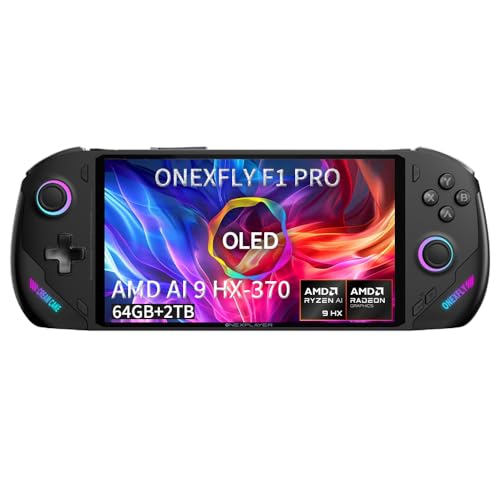
ONEXPLAYER F1 Pro 7" OLED 144Hz
Best for: compact high-performance Windows handheld gaming
- Processor
- Ryzen AI 9 HX 370
- RAM
- 64GB LPDDR5x 7500MHz
- Storage
- 2TB M.2 2280 PCIe 4.0
- Screen Size
- 7"
- Refresh Rate
- 144Hz
- Display Type
- OLED
View on Amazon: ONEXPLAYER F1 Pro 7" OLED 144Hz Affiliate link
The ONEXPLAYER F1 Pro is a 7-inch Windows 11 handheld powered by the Ryzen AI 9 HX 370. It pairs this processor with 64GB of LPDDR5x RAM and a 2TB PCIe 4.0 SSD. The 144Hz OLED display delivers sharp visuals for gaming and work. You get robust connectivity via dual USB4 ports and Wi-Fi 6E. This device suits users who need a portable, high-performance machine for demanding tasks.
Pros
- Ryzen AI 9 HX 370 processor with high NPU performance
- 7-inch 144Hz OLED screen with 1920x1080 resolution
- 64GB LPDDR5x RAM for heavy multitasking
- 2TB M.2 2280 PCIe 4.0 SSD storage
- Dual USB4 ports for versatile connectivity
Cons
- Smaller 7-inch screen limits immersion compared to 8-inch models
- 48.5Wh battery capacity is modest for sustained 65W loads
- Weight of 599g is noticeable for extended handheld use
Good fit if
- You want a compact Windows PC with desktop-class power
- You prioritize high-resolution OLED visuals for gaming
- You need extensive RAM for local AI or coding tasks
Skip if
- You prefer larger screens for better immersion
- You want a console-like experience without Windows
- You need all-day battery life without charging
Verdict: ONEXPLAYER F1 Pro 7" OLED delivers desktop-grade performance in a compact form factor. It fits users who need a powerful, portable Windows workstation for gaming and productivity.

ONEXPLAYER G1 3-in-1 Handheld
Best for: large screen productivity and eGPU expansion
- Processor
- Ryzen AI 9 HX 370
- RAM
- 64GB LPDDR5x 7500MHz
- Storage
- 4TB M.2 2280 PCIe 4.0 SSD
- Screen Size
- 8.8"
- Refresh Rate
- 144Hz
- Resolution
- 2560×1600
View on Amazon: ONEXPLAYER G1 3-in-1 Handheld Affiliate link
The ONEXPLAYER G1 is an 8.8-inch Windows 11 handheld with a Ryzen AI 9 HX 370 processor and 64GB of RAM. It features a 144Hz 2.5K touchscreen and 4TB of storage. This device supports OCuLink eGPUs and includes a detachable keyboard. It suits users who need a large productivity screen and high expandability in a portable form factor.
Pros
- 8.8-inch 2.5K 144Hz touchscreen with 500 nits brightness
- Ryzen AI 9 HX 370 processor with 64GB LPDDR5x RAM
- 4TB PCIe 4.0 SSD for extensive storage
- OCuLink port for external GPU connectivity
- Detachable magnetic keyboard for laptop-style use
Cons
- Heavier 880g body compared to standard handhelds
- Single fan cooling system may limit sustained performance
- Larger 8.8-inch screen reduces one-handed portability
Good fit if
- You want a large 8.8-inch screen for productivity
- You need 64GB RAM and 4TB storage
- You plan to use an external GPU via OCuLink
Skip if
- You prefer a lighter device under 800g
- You want a smaller 7-inch handheld form factor
- You need a built-in discrete graphics card
Verdict: ONEXPLAYER G1 8.8" 64GB 4TB is ideal for users who prioritize screen real estate and storage capacity over compact portability. It fits those who need a versatile device that doubles as a mini-laptop.
Specifications side by side
| Spec | ONEXPLAYER F1 Pro 7" OLED 144Hz | ONEXPLAYER G1 3-in-1 Handheld |
|---|---|---|
| Processor | Ryzen AI 9 HX 370 | Ryzen AI 9 HX 370 |
| RAM | 64GB LPDDR5x 7500MHz | 64GB LPDDR5x 7500MHz |
| Storage | 2TB M.2 2280 PCIe 4.0 | 4TB M.2 2280 PCIe 4.0 SSD |
| Screen Size | 7" | 8.8" |
| Refresh Rate | 144Hz | 144Hz |
| Display Type | OLED | not stated |
| Resolution | 1920×1080 | 2560×1600 |
| Graphics | not stated | Radeon 890M |
| Operating System | Windows 11 | Windows 11 Home |
| Storage Capacity | 2TB | not stated |
| Color | Black | Black |
| Memory | 64GB | 64GB |
| Platform | PC | PC |
| Use | not stated | Desktop |
| Dimensions | not stated | 9.8 × 7.5 × 3.9 inches |
| Size | AI 370-64GB+2TB | AI-370-64GB+4TB |
| Model | ONEXFLY | ONE XPLAYER G1 |
Frequently asked questions
Is the ONEXPLAYER F1 Pro OLED display better than the G1 screen?
Yes, the F1 Pro features an OLED panel, which typically offers deeper blacks and higher contrast ratios than standard LCDs. The G1 uses a standard display type. Both screens share a 144Hz refresh rate for smooth motion, but the F1’s 7-inch size provides a more compact viewing experience compared to the G1’s 8.8-inch panel.
Which model has more internal storage capacity?
The ONEXPLAYER G1 offers more base storage with a 4TB configuration. The F1 Pro comes with 2TB of storage. Both devices support substantial game libraries and large files. If you need maximum space for productivity or media without external drives, the G1’s larger capacity is the better choice for your needs.
Do both handhelds have the same processor speed?
Yes, both devices are powered by the AMD Ryzen AI 9 HX 370 processor. This chip delivers consistent desktop-grade performance across both models. You get identical CPU capabilities for gaming and multitasking. The main differences lie in the screen technology and physical dimensions rather than processing power.
Which device is better for travel due to size?
The F1 Pro is better for travel because of its compact 7-inch form factor. It is designed to fit into smaller bags and offers a portable experience. The G1 is larger at 9.8 inches in length, making it less convenient for on-the-go use. Choose the F1 Pro if portability is your priority.
Can the ONEXPLAYER G1 function as a laptop?
The G1 is marketed as a 3-in-1 handheld that doubles as a mini-laptop. Its larger 8.8-inch screen and wider dimensions support this versatile workflow. The F1 Pro is strictly a handheld device. If you need a device that bridges handheld gaming and desktop productivity, the G1’s design is more suitable.
Do both units run Windows 11?
Yes, both the F1 Pro and the G1 ship with Windows 11. This ensures compatibility with the full range of PC games and productivity software. You get the same operating system experience on both devices. The choice between them depends on screen size and storage rather than software differences.
Is there a difference in RAM between the two models?
No, both devices include 64GB of RAM. This shared memory specification allows for smooth multitasking and handling of demanding applications on either unit. You do not need to worry about performance gaps related to memory. Both models provide ample resources for high-end gaming and professional tasks.