ONEXPLAYER F1 Pro vs ONEXPLAYER 3 Gaming Handheld PC: Spec Comparison
As an Amazon Associate we earn from qualifying purchases. Links on this page are affiliate links.
This onexplayer f1 pro vs 3 gaming handheld PC comparison looks at two distinct Windows machines. Both run Windows 11 and feature high-refresh OLED displays. They also share Wi-Fi 6E connectivity and Hall-effect controllers. The main difference lies in form factor and processing power. The F1 Pro is a compact 7-inch device with a Ryzen AI 9 chip. The ONEXPLAYER 3 is a larger 8.8-inch system with detachable controllers and an Intel Arc G3 Extreme processor. Each targets different portability needs.
Key differences
| Aspect | ONEXPLAYER F1 Pro 7" OLED 144Hz | ONEXPLAYER 3 8.8-Inch AMOLED |
|---|---|---|
| Processor | Ryzen AI 9 HX 370 | Intel Arc G3 Extreme |
| RAM | 64GB LPDDR5x | 32GB LPDDR5X |
| Screen Size | 7 inches | 8.8 inches |
| Storage | 2TB SSD | 1TB SSD |
| Display Resolution | 1920×1080 | 1920x1200 |
| Controller Type | Integrated | Detachable |
Which one should you choose?
Choose ONEXPLAYER F1 Pro 7" OLED 144Hz if
- You prioritize maximum RAM and storage capacity for heavy multitasking.
- You want a compact, lightweight device that fits easily in one hand.
- You prefer a dedicated handheld form factor without detachable parts.
Choose ONEXPLAYER 3 8.8-Inch AMOLED if
- You want a larger screen with a taller 16:10 aspect ratio.
- You need detachable controllers to switch between handheld and tablet modes.
- You prefer an Intel-based architecture with Arc graphics integration.
Verdict: The F1 Pro suits users who need high-end specs in a small, integrated package. The ONEXPLAYER 3 is better for those who want a bigger display and modular design. Choose based on your preferred screen size and controller style.
Spec Comparison: F1 Pro vs 3
processor performance
The ONEXPLAYER F1 Pro uses the Ryzen AI 9 HX 370, featuring an NPU with up to 80 TOPS of AI performance. This chip is designed for high-end desktop-class workloads and on-device AI models. The ONEXPLAYER 3 relies on the Intel Arc G3 Extreme, which combines a 14-core CPU with the Arc B390 graphics and a 46 TOPS NPU. While the Intel setup handles AAA PC games on Windows 11, the Ryzen chip offers significantly higher raw AI compute power. If your workflow involves heavy local AI tasks or intensive multi-threaded processing, the F1 Pro provides a clear advantage in computational headroom and modern AI acceleration capabilities.
memory capacity
Memory bandwidth and capacity are critical for multitasking and large game assets. The ONEXPLAYER F1 Pro comes equipped with 64GB of LPDDR5x memory running at 7500MHz. This high-speed, large-capacity RAM allows for smoother performance when running multiple applications or editing large files. The ONEXPLAYER 3 offers 32GB of LPDDR5X memory. While sufficient for most gaming scenarios, it is half the capacity of the F1 Pro. For users who plan to keep many browser tabs open while gaming or use memory-intensive creative tools, the F1 Pro’s 64GB configuration provides a substantial buffer against slowdowns and swapping.
storage size
Storage capacity determines how many games and files you can keep locally. The base model of the ONEXPLAYER F1 Pro includes a 2TB M.2 2280 PCIe 4.0 SSD. This ample space is ideal for storing a large library of modern PC titles. The ONEXPLAYER 3 is listed with 1TB of SSD storage in its key specifications. Although variations may exist, the standard configuration offers half the space of the F1 Pro. If you frequently download large AAA games and do not rely heavily on external drives or cloud storage, the F1 Pro’s 2TB drive reduces the need to manage space or purchase additional storage later.
screen resolution
Both devices offer high-refresh-rate OLED displays, but the resolution differs. The ONEXPLAYER F1 Pro features a 7-inch screen with a 1920x1080 resolution, resulting in a sharp 315 PPI. The ONEXPLAYER 3 has a larger 8.8-inch display with a 1920x1200 resolution. While the F1 Pro has a higher pixel density, the 3 offers a taller aspect ratio and more screen real estate. The 3 also supports VRR for smoother visuals. If you prefer a larger canvas for media consumption or desktop-like productivity, the 3’s bigger panel is better. If you prioritize pixel sharpness on a more compact screen, the F1 Pro holds the edge.
portability and weight
Portability is a key factor for handheld gaming. The ONEXPLAYER F1 Pro weighs 599g, making it significantly lighter and easier to hold for extended periods. It is designed as a compact handheld that can dock for desktop use. The ONEXPLAYER 3 weighs 1.72 pounds, which is approximately 780g. This extra weight comes from its larger 8.8-inch screen and detachable controller design. The 3 can transform into a tablet or mini-PC, offering more versatility in form factor. However, for pure handheld comfort and one-handed or two-handed portable gaming, the lighter F1 Pro is easier to carry and use without fatigue.
Which handheld fits your workflow best
Users needing maximum RAM for multitasking
The ONEXPLAYER F1 Pro includes 64GB of LPDDR5x RAM. This large memory capacity supports heavy multitasking and running on-device AI models efficiently. You get a 2TB PCIe 4.0 SSD for ample storage. The 65W sustained performance ensures stable operation. This setup suits those who treat the device as a portable workstation alongside gaming.
Players preferring a larger AMOLED display
The ONEXPLAYER 3 features an 8.8-inch AMOLED screen. It offers a 1920x1200 resolution and 1100 nits brightness. Variable Refresh Rate ensures smooth visuals. The detachable controllers allow tablet or laptop modes. This larger form factor provides a more immersive viewing experience for AAA titles and media consumption compared to smaller handhelds.
Those wanting high AI processing power
The F1 Pro uses the Ryzen AI 9 HX 370 processor. It delivers up to 80 TOPS of NPU performance. This level of AI power handles complex on-device models and modern AI workloads. The desktop-class chip ensures high performance for coding tools and PC game stores. You get superior AI capabilities for future-proofing your portable setup.
Users valuing detachable controller versatility
The ONEXPLAYER 3 includes detachable controllers with Hall-effect sticks. You can swap between handheld, tablet, and mini-PC modes easily. The 85Wh battery supports longer sessions. Dual USB4 ports and Wi-Fi 6E provide robust connectivity. This flexible design suits users who want to switch between gaming and productivity tasks without changing devices.
The products compared
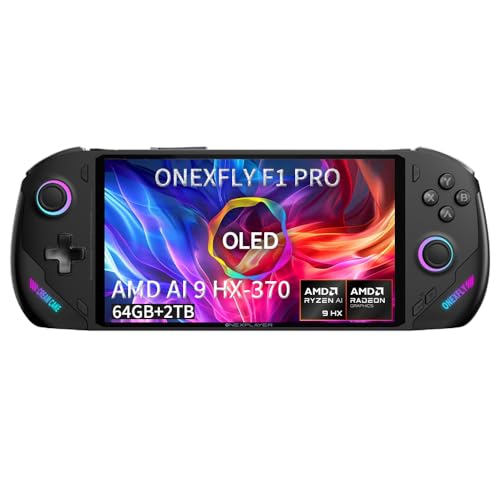
ONEXPLAYER F1 Pro 7" OLED 144Hz
Best for: Users needing high RAM and a compact OLED screen
- Processor
- Ryzen AI 9 HX 370
- RAM
- 64GB LPDDR5x 7500MHz
- Storage
- 2TB M.2 2280 PCIe 4.0
- Screen Size
- 7"
- Refresh Rate
- 144Hz
- Display Type
- OLED
View on Amazon: ONEXPLAYER F1 Pro 7" OLED 144Hz Affiliate link
The ONEXPLAYER F1 Pro is a 7-inch Windows 11 handheld featuring a Ryzen AI 9 HX 370 processor and 64GB of LPDDR5x RAM. It pairs this desktop-class memory with a 2TB PCIe 4.0 SSD and a 144Hz OLED display. You get 65W sustained performance and USB4 connectivity. This setup suits you if you want portable desktop power and high-end AI capabilities in a compact form factor.
Pros
- Ryzen AI 9 HX 370 with 64GB LPDDR5x RAM
- 7-inch 144Hz OLED display with touch support
- 2TB M.2 2280 PCIe 4.0 storage
- 65W GaN charging and desktop-class performance
- Hall-effect controls for drift-free input
Cons
- 7-inch screen is smaller than the 8.8-inch AMOLED on the ONEXPLAYER 3
- 48.5Wh battery limits unplugged gaming sessions
- 65W power requirement needs a specific charger
Good fit if
- You need maximum RAM for multitasking or AI models
- You prefer a compact 7-inch OLED display
- You want a portable Windows workstation with desktop specs
Skip if
- You prioritize a larger screen for media consumption
- You want a lighter device with less bulk
- You prefer a console-like locked-down experience
Verdict: ONEXPLAYER F1 Pro 7" OLED Handheld delivers desktop-grade memory and AI processing in a compact chassis. It fits users who need high RAM and a small, high-refresh OLED screen for portable Windows work and gaming.
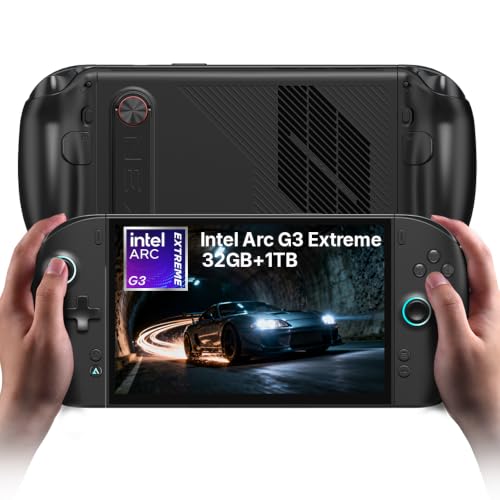
ONEXPLAYER 3 8.8-Inch AMOLED
Best for: Users wanting a large screen and detachable controllers
- Processor
- Intel Arc G3 Extreme
- RAM
- 32GB LPDDR5X
- Screen Size
- 8.8"
- Refresh Rate
- 144Hz
- Display Type
- AMOLED
- Resolution
- 1920x1200
View on Amazon: ONEXPLAYER 3 8.8-Inch AMOLED Affiliate link
The ONEXPLAYER 3 is a 3-in-1 handheld PC powered by the Intel Arc G3 Extreme processor and Intel Arc B390 graphics. It features an 8.8-inch 144Hz AMOLED display with 1100 nits of brightness. The device includes 32GB of LPDDR5X RAM and a 1TB SSD. Its detachable controllers allow you to switch between handheld and tablet modes. The 85Wh battery supports heavy gaming for up to 2.5 hours.
Pros
- Intel Arc G3 Extreme CPU with Arc B390 graphics
- 8.8-inch 144Hz AMOLED display with 1100 nits brightness
- 32GB LPDDR5X RAM and 1TB SSD storage
- Detachable controllers with Hall-effect sticks
- 85Wh battery with vapor chamber cooling
Cons
- 32GB RAM is lower than the 64GB in the F1 Pro
- 1TB SSD is smaller than the 2TB option in the F1 Pro
- 1.72 pounds weight adds bulk compared to smaller handhelds
Good fit if
- You want a large 8.8-inch AMOLED screen for immersive visuals
- You need detachable controllers to switch between handheld and tablet modes
- You prioritize high brightness and VRR for smooth gameplay
Skip if
- You require 64GB of RAM for maximum multitasking
- You prefer a 2TB SSD for extensive game libraries
- You want a lighter device for extended handheld sessions
Verdict: ONEXPLAYER 3 8.8" AMOLED Gaming Handheld offers a large, bright display and detachable controllers for versatile use. It fits users who value screen size and form factor flexibility over maximum RAM or storage capacity.
Specifications side by side
| Spec | ONEXPLAYER F1 Pro 7" OLED 144Hz | ONEXPLAYER 3 8.8-Inch AMOLED |
|---|---|---|
| Processor | Ryzen AI 9 HX 370 | Intel Arc G3 Extreme |
| RAM | 64GB LPDDR5x 7500MHz | 32GB LPDDR5X |
| Storage | 2TB M.2 2280 PCIe 4.0 | not stated |
| Screen Size | 7" | 8.8" |
| Refresh Rate | 144Hz | 144Hz |
| Display Type | OLED | AMOLED |
| Resolution | 1920×1080 | 1920x1200 |
| Graphics | not stated | Arc B390 |
| Operating System | Windows 11 | Windows 11 |
| Storage Capacity | 2TB | 1TB |
| Color | Black | Black |
| Memory | 64GB | not stated |
| Platform | PC | PC |
| Weight | not stated | 1.72 pounds |
| Size | AI 370-64GB+2TB | Intel Arc G3E 32+1TB |
| Model | ONEXFLY | ONEXPLAYER 3 |
Frequently asked questions
Which handheld has the larger display?
The ONEXPLAYER 3 features the larger screen. It offers an 8.8-inch AMOLED display, which provides more visual real estate for gaming and media. The ONEXPLAYER F1 Pro uses a smaller 7-inch OLED panel. You should choose the 3 if screen size is your priority.
Does the F1 Pro have more RAM than the 3?
Yes, the F1 Pro includes significantly more memory. It comes with 64GB of RAM, which supports heavy multitasking and on-device AI workloads. The ONEXPLAYER 3 is listed with 32GB of RAM. If you need maximum memory capacity, the F1 Pro is the stronger choice.
What is the difference in storage capacity between the two?
The ONEXPLAYER F1 Pro offers more internal storage space. It includes a 2TB SSD, allowing you to store more games and files. The ONEXPLAYER 3 provides 1TB of storage. You will need to manage space more carefully on the 3 if you have a large library.
Can the ONEXPLAYER 3 controllers be detached?
Yes, the ONEXPLAYER 3 supports detachable controllers. This design allows for versatile use, such as using the device as a tablet or connecting it to a display. The F1 Pro is described as a compact handheld chassis without mention of detachable parts. Choose the 3 for flexibility.
Which device is lighter to carry?
The ONEXPLAYER 3 is the lighter option. It weighs 1.72 pounds, making it easier to hold for extended periods. The F1 Pro is a compact unit but does not list a specific weight in the provided data. If low weight is critical, the 3 has the advantage.
Do both devices run Windows 11?
Yes, both handhelds operate on Windows 11. This ensures compatibility with the full range of PC games and applications. You get the same operating system experience on both devices. The difference lies in the hardware specs and form factor rather than the software environment.
Which screen type offers better contrast?
Both devices use advanced display technologies for high contrast. The F1 Pro features a 7-inch OLED panel with a 144Hz refresh rate. The 3 uses an 8.8-inch AMOLED display. OLED and AMOLED technologies both provide deep blacks and vibrant colors. The choice depends on your preferred screen size.