HP Reverb G2 VR Headset Review: Who It Fits and Who Should Skip It
As an Amazon Associate we earn from qualifying purchases. Links on this page are affiliate links.
This hp reverb g2 VR headset review examines a tethered PC VR device built for detailed computer simulations and gaming. The hardware centers on dual 2160 x 2160 LCD panels that supply high clarity to each eye. Valve-designed off-ear speakers provide integrated spatial audio directly on the frame. The unit weighs 1.1 pounds and measures 7.32 by 3.31 by 2.95 inches. You connect the hardware through an included 6-meter cable, DisplayPort adapter, and dedicated power adapter. Four physical cameras handle inside-out tracking without external sensors.
What stands out
- Dual 2160 x 2160 LCD panels per eye
- Spatial audio speakers designed by Valve
- Four built-in tracking cameras
- Six-meter cable with DisplayPort and mini-DisplayPort adapters
Who it fits
Good fit for
This headset suits PC players who prioritize visual resolution and audio clarity. The 2160 x 2160 per-eye LCD panels serve flight simulators and racing titles where instrument readability matters. The 1.1-pound weight and adjustable lens spacing accommodate long sessions and different eye distances. If your setup includes a desktop or mobile PC with DisplayPort connectivity, the supplied 6-meter cable provides ample reach for seated play.
Who should skip it
Skip this device if you want standalone wireless VR. The hardware requires a wired connection using the included 6-meter cable, power adapter, and PC platform. Players without a dedicated DisplayPort or mini-DisplayPort output cannot connect the headset directly. Users who need standalone gaming without a PC or who prefer untethered movement should choose a self-contained device instead of this wired PC hardware.
Verdict: The HP Reverb G2 delivers high-resolution PC VR through dual 2160 x 2160 displays and integrated Valve speakers. Its wired setup and four tracking cameras target desktop users who want focused visual clarity.
Key HP Reverb G2 Specifications Explained
6m headset cable for desktop and mobile PCs
This tether gives you roughly twenty feet of slack from your host machine. You gain room to move around your desk setup without pulling against the physical connector. Standing players benefit most from this generous reach. If you use compact handheld gaming PCs or small setups, check whether you need adapters to manage long cable runs.
1.1 pounds weight
This rating keeps physical mass low on your head during long play sessions. You experience less neck fatigue when looking around virtual environments. Flight and racing simulation enthusiasts who wear hardware for hours benefit directly. When comparing portable hardware or tethered gear, prioritize lower weights to stay comfortable without needing aftermarket counterweights or balance straps.
4 built in cameras
These optical sensors handle inside-out tracking directly from the chassis. You do not need external base stations mounted across your room to register movement. Players with limited desk space benefit from the streamlined physical footprint. Compare this configuration against external sensor arrays when evaluating how quickly you can set up and store your VR gaming gear.
Lenses that adjust to suit different eye distances
This physical adjustment lets you match the optics to your specific interpupillary distance. You get a sharper image center and reduced eye strain during extended use. Users with narrower or wider eye spacing benefit immediately from this customization. When shopping for display gear, check for hardware-level adjustments rather than software offsets to maintain peak visual clarity.
Physical Design, Dimensions, and Build Quality
The HP Reverb G2 features a black finish and measures 7.32 inches long, 3.31 inches wide, and 2.95 inches high. At 1.1 pounds, the headset chassis maintains a light physical footprint that rests on your head during extended PC VR use. According to the listing, the construction pairs flexible material with an increased cushion size. This soft interface provides physical padding against your face, while mechanical lenses adjust to accommodate different eye distances so you can align the optics properly.
The exterior housing integrates four built-in cameras directly across the frame. This layout handles movement tracking directly from the headset itself. Because of these sensors, you do not need to mount separate external tracking hardware around your room, which helps when your desk space is limited. The package also supplies a DisplayPort to mini-DisplayPort adapter and a power adapter to connect into your PC hardware.
For physical input, the package includes two motion controllers featuring an ergonomic design, according to the listing. These contoured handheld controls give you dedicated physical grips for navigating virtual spaces. The 1.1-pound weight and compact dimensions help you stay mobile whether you play standing or seated.
Setup Process and Everyday Use
Setting up the HP Reverb G2 centers on connecting the hardware directly to your PC. The retail package includes setup instructions, a dedicated power adapter, and a DisplayPort to mini-DisplayPort adapter. You connect the included cable to your desktop or mobile PC. The supplied DisplayPort adapter ensures video compatibility if your machine relies on a smaller port instead of a standard video connection.
Daily operation relies on the hardware adjusting to your physical requirements. You can adjust the lenses directly to suit your specific eye distance. The flexible material and enlarged cushion size adapt to your face during each session to maintain a comfortable fit.
In everyday sessions, the headset uses its four built-in cameras to track your movement across your play space. These integrated hardware cameras capture your physical motion directly from the headset body. You interact with virtual environments using the two included motion controllers. These controllers feature an ergonomic design shaped to fit your hands securely during active use. Throughout your routine, the device operates strictly as a tethered PC platform system, drawing power from the provided adapter while you use it.
Before Buying the HP Reverb G2
Before you buy this headset, confirm your computer hardware matches its physical requirements. The unit targets the PC platform and functions with desktop and mobile PCs. You need an open DisplayPort or mini-DisplayPort connection to use the supplied adapter. You also need an accessible power outlet for the bundled power adapter.
Routine care keeps the hardware working properly. Wipe the flexible cushion material and keep the adjustable lenses clean after sessions. Make sure nothing smudges or covers the four built-in cameras on the headset. Store the two motion controllers safely when not in use.
Across the 1 options featured for 2026, this model differs from self-contained portable devices. It relies on a direct physical hookup to a desktop or mobile PC using the included 6m headset cable.
Check before you buy
- Confirm your PC has a compatible DisplayPort or mini-DisplayPort port.
- Verify an available wall outlet is within reach for the power adapter.
- Check that your space accommodates the 6m headset cable connection.
- Ensure your eye spacing fits the range of the adjustable lenses.
The product at a glance
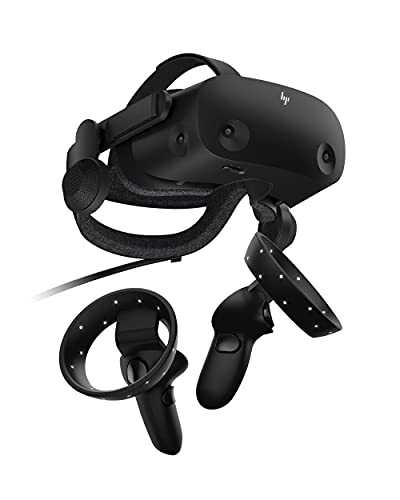
HP Reverb G2 PC VR Headset
Best for: high-resolution PC simulation and cockpit gaming
- Display Resolution
- 2160 x 2160
- Display Type
- LCD
- Connectivity
- DisplayPort
- Tracking Type
- Inside-Out
- Color
- Black
- Platform
- PC
View on Amazon: HP Reverb G2 PC VR Headset Affiliate link
The HP Reverb G2 is a wired PC VR headset designed for high visual clarity. You get dual 2160 x 2160 LCD panels, integrated Valve speakers, and four camera sensors for inside-out tracking. At 1.1 pounds, it connects using a 6-meter cable, making it suitable if you prioritize high-resolution desktop simulations and tethered PC gaming.
Pros
- 2160 x 2160 LCD panels per eye
- Spatial audio speakers designed with Valve
- Four built-in tracking cameras
- Adjustable lens distance
- Lightweight 1.1-pound headset frame
Cons
- Requires a tethered cable and separate power adapter
- Compatible only with PC platforms
Good fit if
- You want 2160 x 2160 per-eye resolution for PC simulation setups.
- You prefer built-in camera tracking without external wall sensors.
Skip if
- You want a standalone wireless headset that functions without a PC.
- You prefer hardware that runs without an external power adapter.
Verdict: HP Reverb G2 PC VR Headset fits desktop flight and racing simulator users who demand dual 2160 x 2160 displays alongside integrated Valve speakers. Its tethered design and dedicated power adapter target stationary PC workstations rather than room-scale portable play.
Specifications side by side
| Spec | HP Reverb G2 PC VR Headset |
|---|---|
| Display Resolution | 2160 x 2160 |
| Display Type | LCD |
| Connectivity | DisplayPort |
| Tracking Type | Inside-Out |
| Color | Black |
| Platform | PC |
| Dimensions | 7.32 × 3.31 × 2.95 inches |
| Weight | 1.1 pounds |
| Model | 1G5U1AA#ABA |
Frequently asked questions
What platform does the HP Reverb G2 run on?
The HP Reverb G2 runs exclusively on the PC platform. You connect the hardware to your compatible desktop or mobile computer setup. Because it relies on a wired connection and dedicated power delivery, the device is engineered specifically for stationary computer workstations rather than standalone use without a PC.
Which gaming genres work best with the HP Reverb G2?
This headset is best for seated simulation experiences like flight and racing simulators. The hardware design emphasizes high-resolution cockpit views at a fixed workstation. While you can play various PC titles, the wired design and dedicated power adapter make it particularly suitable for desk or cockpit simulator rigs.
What type of display panels does the HP Reverb G2 feature?
The HP Reverb G2 features dual LCD screens. Each display panel provides a resolution of 2160 x 2160 pixels, giving visual output directly to each eye. This specific LCD configuration delivers dense pixel clarity across the field of view, matching the demands of detailed visual rendering in PC simulations.
What are the dimensions and total weight of the HP Reverb G2?
The headset chassis weighs 1.1 pounds. In terms of dimensions, the hardware measures 7.32 inches in length, 3.31 inches in width, and 2.95 inches in height. This compact footprint and lightweight build help balance the unit comfortably on your head when you sit down for long gaming sessions.
Does the HP Reverb G2 include integrated audio hardware?
Yes, the HP Reverb G2 includes integrated speakers designed alongside Valve. These audio units are built directly into the headset chassis to deliver sound without requiring separate headphones. The speakers sit off the ear, providing spatial computer audio while you operate your stationary simulation or PC gaming setup.
What specific hardware model is this HP Reverb G2 headset?
This specific black edition carries the official manufacturer model number 1G5U1AA#ABA. It represents the PC-focused hardware version from HP built for high-resolution simulation gaming. When you check system configurations or replacement accessories, referencing this exact model code ensures you find parts that align with your unit.